Changing usage type and scope
When using server projects, you can choose from full usage, where an entire project is used, or partial usage, where you select the specific project scope you want to use. After using a project, you can change the usage type (full or partial) and scope as described below.

Selecting usage scope
If the elements in the selected usage scope reference elements outside the scope, these referenced elements will be matched with corresponding elements in the main project. If corresponding elements are not found in the main project and its current usages, all references to them will be removed from the selected scope.
For example, if the usage scope contains a part whose type is outside the scope, and the main project does not include that type, the reference to the type will be removed. As a result, the part in the used project will no longer have a type.
To minimize the risk of lost references, it is recommended to use all standard profiles of the used project in your main project beforehand.
Changing usage type
To change the usage type from full to partial
- Do one of the following:
- In the main menu, select Options > Project Usages.
- In the main menu, select Collaborate > Project Usages > Project Usages.
- In the Project Usages dialog, select the used project you want to change, click
 , and select Select Scope.
 - In the Select Scope (Technology Preview) dialog, select the project elements you want to use. Selecting a parent element automatically includes all of its owned elements in the usage scope.
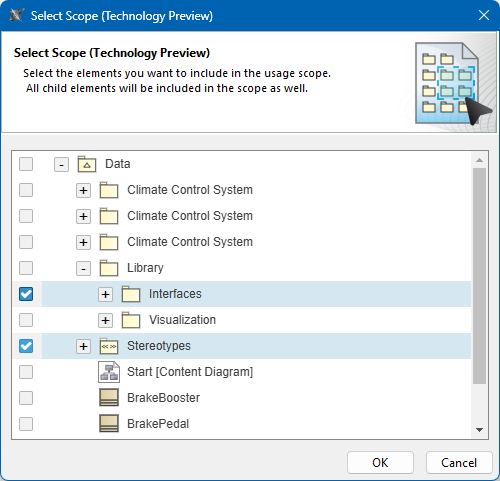
- Click OK.
- After the usage type is changed, click OK to close the Project Usages dialog.
To change the usage type from partial to full
- Do one of the following:
- In the main menu, select Options > Project Usages.
- In the main menu, select Collaborate > Project Usages > Project Usages.
- In the Project Usages dialog, select the project you want to change, click , and select Change to Full Usage.

- After the usage type is changed, click OK to close the Project Usages dialog.
Changing usage scope
To change the usage scope
- Do one of the following:
- In the main menu, select Options > Project Usages.
- In the main menu, select Collaborate > Project Usages > Project Usages.
- In the Project Usages dialog, select the used project you want to change, click , and select Select Scope.
- In the Select Scope (Technology Preview) dialog, change the usage scope by selecting and/or deselecting model elements. Selecting a parent element automatically includes all of its owned elements in the usage scope.
- Click OK.
- After the usage scope is changed, click OK to close the Project Usages dialog.