Manage Profiles
This Technical Practice highlights the importance of managing profiles on the 3DEXPERIENCE platform. It describes how to upload and maintain them on the 3DEXPERIENCE platform.
Why
Every CATIA Magic systems model requires profiles. All profiles and libraries that are bundled with the modeling tool are considered as standard profiles, non-modifiable and essential for the proper performance of the tool. Accessing these standard profiles is mandatory to open a CATIA Magic system model stored in the 3DEXPERIENCE platform. Since profiles are essential for working with CATIA Magic, a profile administrator is necessary to manage profiles and avoid their modification by other users.
What
This technical practice highlights the importance of managing profiles on the 3DEXPERIENCE platform. It describes how to upload and maintain them on the 3DEXPERIENCE platform.
Target Audience
Profile Administrator
Knowledge
Standard Profiles
A standard profile is a CATIA Magic model essential for proper functioning of the tool. It contains packages that extend a reference metamodel, such as UML. Standard profiles come with the modeling tool and its plugins. To enable the CATIA Magic Power'By, they must be added to the platform and be accessible to all CATIA Magic users.
Collaborative Spaces
Collaborative spaces are digital workspaces, where teams and stakeholders can collaborate on various aspects of product design, development and project management.
Access for Collaborative Spaces
Collaborative spaces can have different levels of visibility: public, protected or private. Content in public or protected collaborative spaces is either private or public, depending on the current maturity level of the content. Content in private collaborative spaces is always private. Public collaborative spaces are typically used to store standard content. Use protected or private collaborative spaces to collaborate with other organizations. Members control who can access the content based on their role in the collaborative space and the maturity level of the objects.
The following table defines whether the content is public or private based on the type of collaborative space and the maturity state of the content.
| Collaborative Space Visibility | Maturity State | ||||
| Draft | In Work | Frozen | Released | Obsolete | |
|---|---|---|---|---|---|
| Public | Private | Public | Public | Public | Public |
| Protected | Private | Private | Private | Public | Public |
| Private | Private | Private | Private | Private | Private |
Maturities of System Models
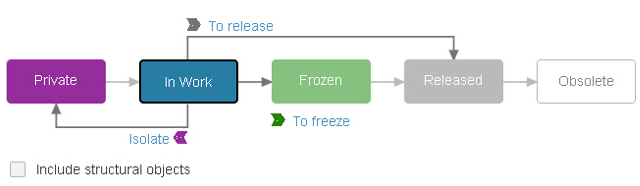
In the 3DEXPERIENCE platform, the maturity states of a physical product help manage its lifecycle by defining distinct stages. Here is an explanation of each state:
| Private | Description: This is the initial state where a physical product is only visible to its creator or a restricted group. Purpose: This state allows early development work and iterations without broader visibility. It is useful for preliminary drafts and experimental designs that are not yet ready for a team review. |
| In Work | Description: This state indicates that the product is under active development and can be accessed and modified by designated team members. Purpose: This state facilitates collaboration among team members, enabling collective development, editing and refinement of the product. This state is crucial for iterative development and incorporating feedback. |
| Frozen | Description: The product is in a state where no further changes can be made except by an authorized personnel. Purpose: This state ensures stability before the final review and release. It allows thorough validation, testing and quality assurance without the risk of unapproved changes. This state acts as a checkpoint for critical reviews. |
| Released | Description: In this state the product is finalized, fully validated and approved for use or production. Purpose: This state marks the product as complete and ready for deployment, manufacturing, or customer use. This state signifies that the product has passed all necessary checks and meets all required standards and specifications. |
| Obsolete | Description: In this state the product is no longer in use and is retired from active development or production. Purpose: This state helps manage and archive older versions or products that are replaced by newer models. This state ensures that obsolete products are clearly marked, preventing their use in current projects and maintaining an organized product catalog. |
Each of these maturity states serves a specific role in managing the product development process, ensuring that products are developed systematically, reviewed thoroughly and transitioned smoothly from concept to completion and eventual retirement. The structured approach of the 3DEXPERIENCE platform for maturity states helps maintain high standards of quality, compliance and efficiency throughout the product lifecycle.
Use Cases
Use Case: Manage Profiles on the 3DEXPERIENCE Platform
Scenario
A Profile Administrator adds profiles to the 3DEXPERIENCE platform for team members to access the profile for opening a systems model.
Actors/personas
Jack Profile Administrator: Jack is responsible for managing the CATIA Magic Profiles on the 3DEXPERIENCE platform.
Workflow
How
Prerequisite Roles
3DSwymer (IFW-OC), Collaborative Industry Innovator (CSV-OC), Collaborative Designer for CATIA Magic (SSY-OC), Magic Systems of Systems Architect (MYH)
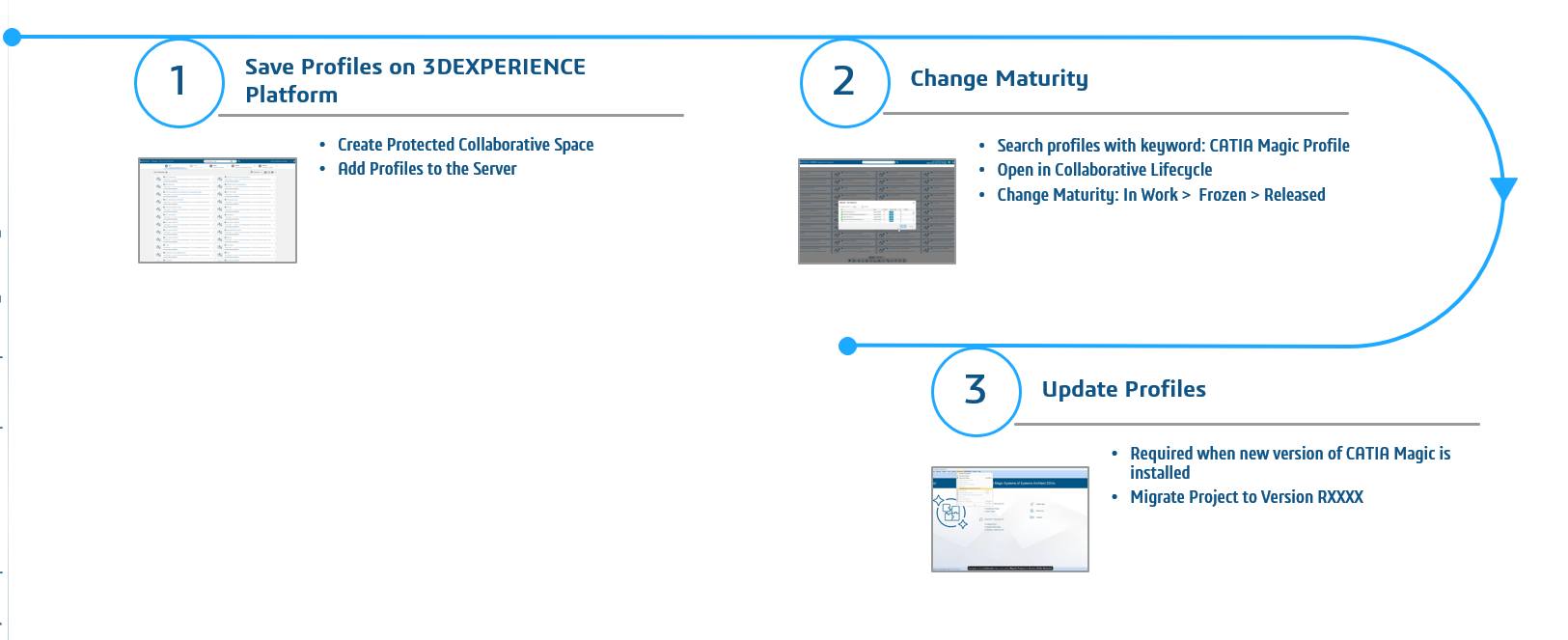
Step 1: Upload CATIA Magic Profiles on 3DEXPERIENCE Platform
Step 2: Change the Maturity of CATIA Magic Profiles
Step 3: Update Profiles on 3DEXPERIENCE Platform
Recommandation
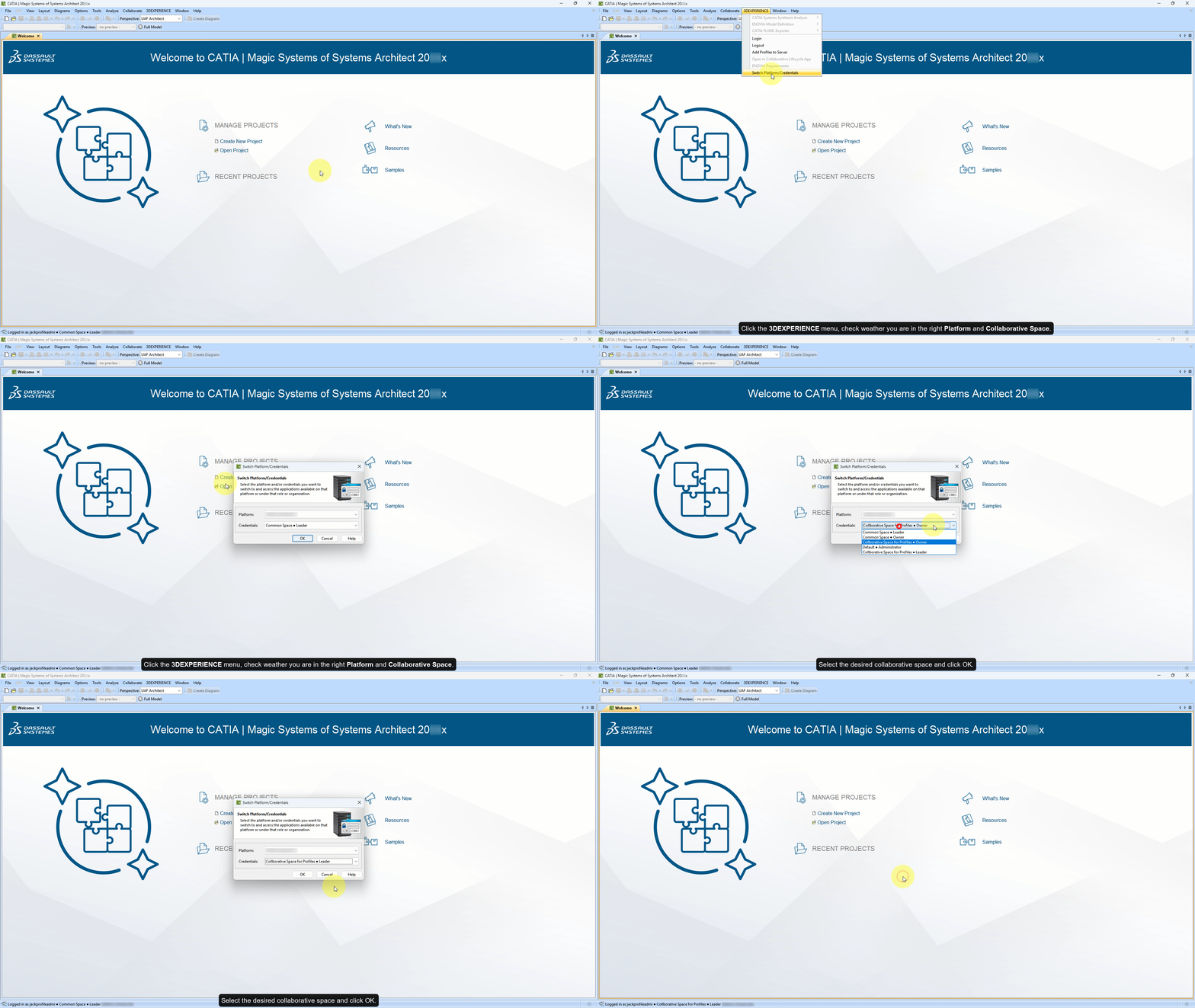
- Ensure, you are on the right 3DEXPERIENCE platform server and Collaborative Spaces.
- Navigate to the 3DEXPERIENCE menu in the CATIA Magic application.
- Select the Switch Platform/Credentials option.
- Select the desired platform and credentials.
- Ensure standard profiles are stored in a protected collaborative space, as this allows visibility to all CATIA Magic users while ensuring a good security level. However, it is also possible to use a public collaborative space.
- While migrating profiles and projects, it is recommended to have the profiles in the Released state.