Changing usage type and scope
When using server projects, you can choose from full usage, where an entire project is used, or partial usage, where you select the specific project scope you want to use. After using a project, you can change the usage type (full or partial) and scope as described below.

Selecting usage scope
If the selected usage scope contains references to elements outside that scope, the modeling tool tries to match those referenced elements with corresponding elements in the main project. If no matching elements are found in the main project or its current project usages, the references are removed.
For example, if the selected scope contains a part whose type is outside the scope, and that type is not available in the main project or its current project usages, the reference to the type is removed. As a result, the part in the used project no longer has a type.
To reduce the risk of losing references, make sure that the main project already uses all standard profiles from the used project before creating a partial usage.
Changing usage type
To change the usage type from full to partial
- Do one of the following:
- In the main menu, select Options > Project Usages.
- In the main menu, select Collaborate > Project Usages > Project Usages.
- In the Project Usages dialog, select the used project you want to change, click
 , and select Select Scope.
 - In the Select Scope dialog, select the project elements you want to use. Selecting a parent element automatically includes all of its owned elements in the usage scope.
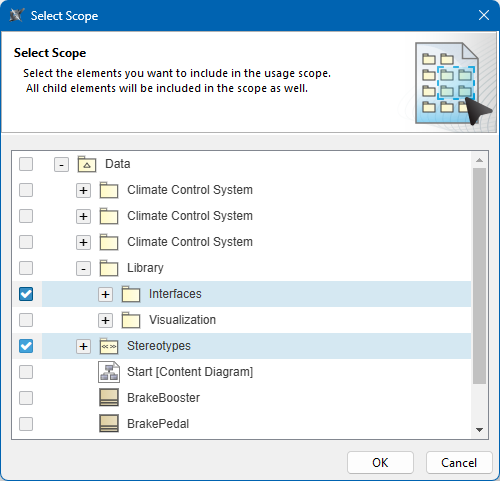
- Click OK.
- After the usage type is changed, click OK to close the Project Usages dialog.
To change the usage type from partial to full
- Do one of the following:
- In the main menu, select Options > Project Usages.
- In the main menu, select Collaborate > Project Usages > Project Usages.
- In the Project Usages dialog, select the project you want to change, click , and select Change to Full Usage.

- After the usage type is changed, click OK to close the Project Usages dialog.
Changing usage scope
To change the usage scope
- Do one of the following:
- In the main menu, select Options > Project Usages.
- In the main menu, select Collaborate > Project Usages > Project Usages.
- In the Project Usages dialog, select the used project you want to change, click , and select Select Scope.
- In the Select Scope dialog, change the usage scope by selecting and/or deselecting model elements. Selecting a parent element automatically includes all of its owned elements in the usage scope.
- Click OK.
- After the usage scope is changed, click OK to close the Project Usages dialog.