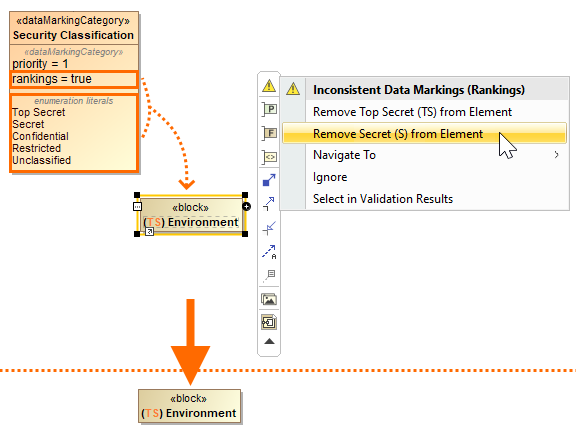
The validation rule checks if the added Data Markings belong to the same ranked Data Marking Category.
Severity
warning
Constrained Element
Element
Solvers
Remove <Data Marking> from Element - once selected, you can choose which one of the added Data Markings to remove from the element.
<Data Marking> - represents the full Data Marking name and portion marking in parentheses, e.g. "Remove Top Secret (TS) from Element".
Example
The element has both Secret (S) and Top Secret (TS) Data Markings added, both of which belong to the same ranked Data Marking Category Security Classification. The error is resolved by removing the Secret (S) Data Marking from the element via Remove from Element solver.