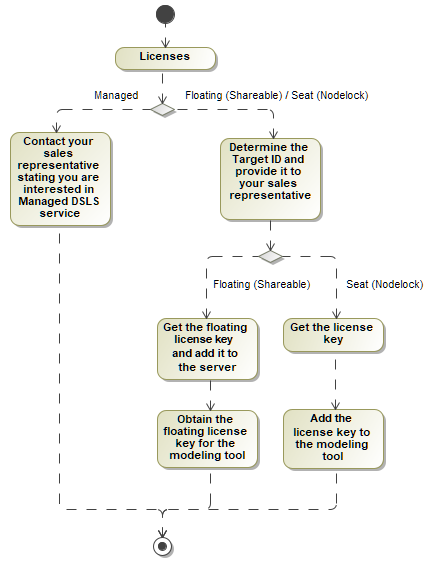
Installation and Licensing Current: Modeling tools and plugins licensing Modeling tools and plugins licensing The product license is identified by the license key. The license key corresponds to:License server: DSLS, FlexNet.License type: Nodelock/Seat, Floating, Managed.License category: Commercial, Academic, Student, Non-Profit Research.Availability:FlexNet: SeatFloatingDSLS: NodelockFloatingManagedLicensing scheme Licensing workflowFlexNet Seat / DSLS Nodelock licenseDetermine your Target ID.Provide it to your sales representative.Get a license key.Add a license key to the modeling tool.Floating license FlexNet server license Determine server Host ID/Target ID.Provide it to your sales representative.Get a floating license key and add it to the floating license server. Typically, this step is performed by the license server administrator. Obtain a floating license key for a modeling tool. DSLS server license Determine server Target ID.Provide it to your sales representative.Get a floating license key and add it to the floating license server.Obtain a floating license key for a modeling tool.Managed licenseContact your Dassault Systèmes sales representative if you have an interest in Managed DSLS service. For more information, see the Managed licensing page. ×