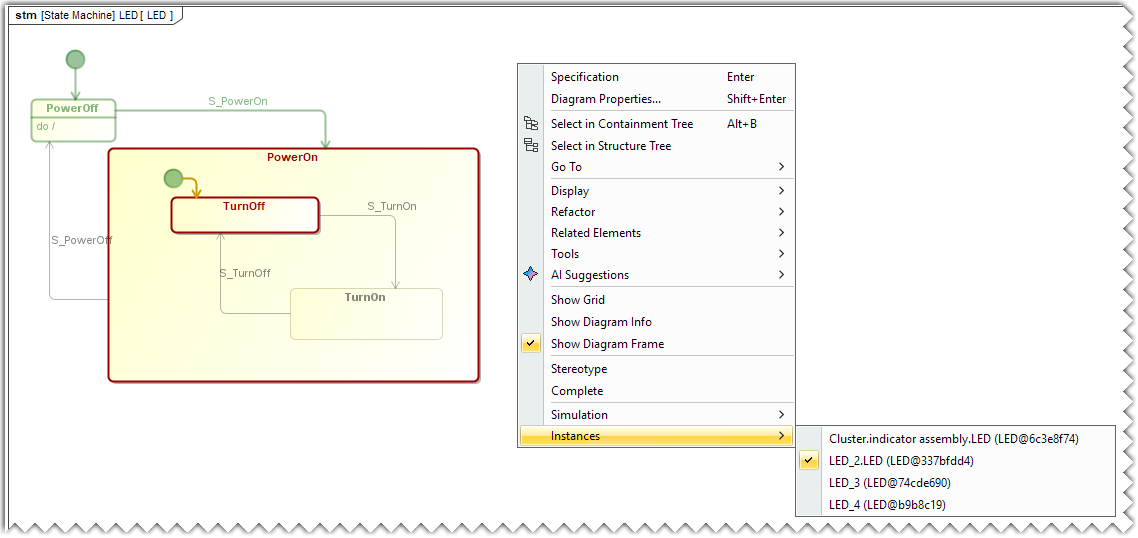
You can filter animation for one specific object in a Behavioral Diagram, such as a State Machine, Activity, or Sequence Diagram. If several instances of the same behavior exist, the Behavioral Diagram automatically shows animation for only one instance. By default, the diagram shows animation for the first instance that annotated the diagram. This prevents the diagram from merging events from multiple concurrent instances and improves clarity during simulation analysis. You can switch the displayed instance from the contextual menu.
The list shows only the objects that currently annotate the diagram or have annotated it previously. You cannot pre-select an object that has not started this behavior.
If multiple sessions of the same behavior run under the same object, the diagram shows their animation together.
The Instance command appears only when multiple objects are annotated in the currently opened diagram.
To select an instance
Open the State Machine, Activity, or Sequence diagram.
Right-click anywhere in the diagram, select Instances, and choose the required object instance from the list.
You can select an instance in both the open diagram and the diagram preview.