• Modeling Tools
  • Modeling Tools
  • Modeling Tools
  • Modeling Tools
  • Topics
  • Home
  • Earlier Versions
  • Magic Software Architect / MagicDraw
    • Magic Systems of Systems Architect / Cameo Enterprise Architecture
    • Magic Cyber Systems Engineer / Cameo Systems Modeler
    • Magic Software Architect / MagicDraw
  • 2026x Refresh1
    • 2026x Refresh1 (latest)
    • 2026x
  • Modeling Tools
  • General modeling features
  • Tools
  • Model Merge
  • Current: Analyzing and managing merge results

Analyzing and managing merge results

Merge results are displayed in the Merge window. Read about analyzing and managing model merge results in

  • (2026x Refresh1) Getting merge summary information and changes legend
  • (2026x Refresh1) Understanding content of the Merged Result panel
  • (2026x Refresh1) Inspecting element property changes in the Specification panel
  • (2026x Refresh1) Inspecting changes in the Change details panel
  • (2026x Refresh1) Displaying and navigating through changes
  • (2026x Refresh1) Quickly navigating through conflicting changes
  • (2026x Refresh1) Accepting and rejecting changes using shortcut menu
  • (2026x Refresh1) Viewing and analyzing changes of modified diagrams
  • (2026x Refresh1) Generating a differences report

If you do not need to perform the analysis and management of merge results, proceed to (2026x Refresh1) Finishing and canceling merge.
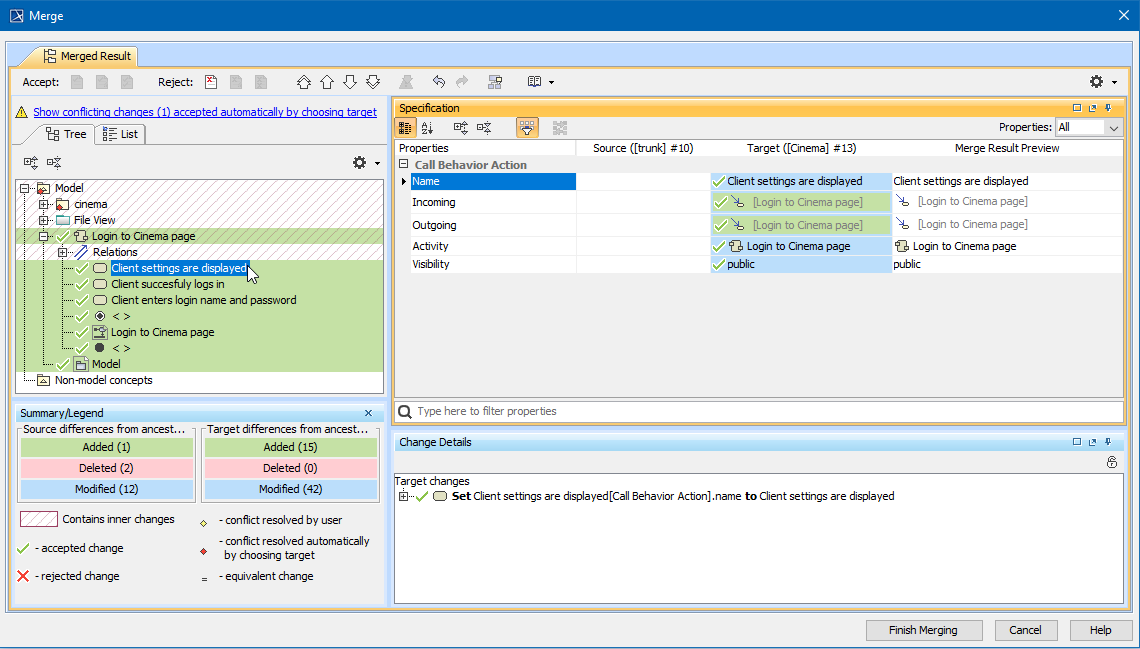
Example of the Merge window.
Modeling Tools Logo
Support information / FAQ / Submit a request
Copyright © 2026 Dassault Systemes Americas Corp. • Powered by Scroll Sites and Atlassian Confluence