Modelica export
Export to Modelica tool allows quick and automatic synchronization between high-level system architecture and behaviour model definitions and Modelica simulation models by translating and mapping corresponding concepts and names. The Modelica export is based on SysPhS standard that is described in details in the OMG SysPhS specification (SysML Extension for Physical Interaction and Signal Flow Simulation). You can use the Modelica export functionality in our tool to export your model to the Modelica file. The export includes blocks, parametrics, state machines, internal structures with ports, interfaces and connectors. The generated *.mo file is ready to open with Modelica tools. As example of exported model to the Modelica file, see the figure below.
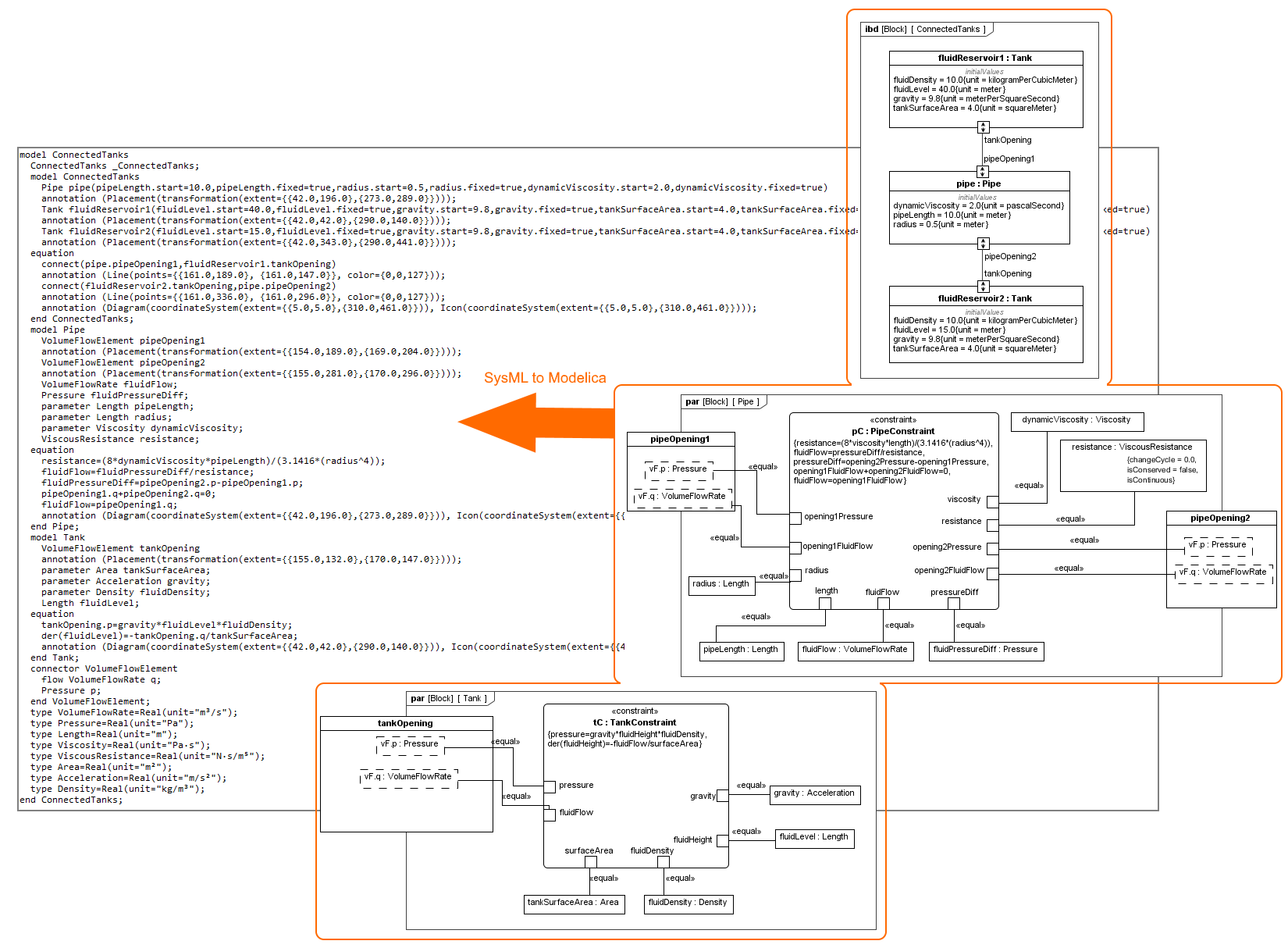
The ConnectedTanks Block exported to the Modelica file.
Preparing SysML v1 model for Modelica export
No special prerequisites are required to be able to use SysML v1 to Modelica transformation. Any existing pure SysML v1 models can be exported into Modelica with a high level of success. That is especially true for black-box architecture definitions (blocks, parts, ports, parameters, interfaces and connectors). However, if user wants to export full behavior implementation and expects it to be ready and simulatable in Modelica, some special annotation may be required. Modelica can only solve the models where number of variables is no more than number of equations. That means all SysML v1 properties can’t be exported as variables, some must be marked as constants or parameters.
SysML v1 properties
You can prepare your model by:
- Applying «PhSConstant» stereotype to a SysML v1 property if it has fixed value and not going to change during simulation. It is exported as Modelica parameter.
- Applying «PhSVariable» stereotype if you want to mark property as Modelica variable and fill appropriate tags (isContinuous, isConserved and changeCycle) if needed. Read more >>
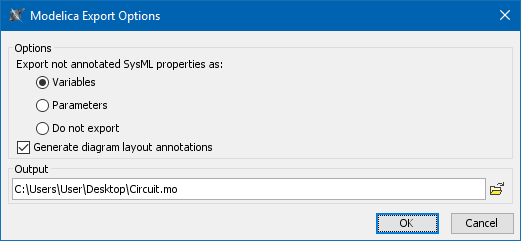
If SysML v1 properties are not annotated with «PhSConstant» or «PhSVariable» stereotypes, they all are exported equally, as you select in the Modelica Export Options dialog: all as parameters, variables or skipped. Descriptions of export options >>
Diagrams
SysML IBD diagrams can be optionally converted into Modelica graphical annotations. Only one IBD diagram per Block is exported, so if you have more, make sure that the right one is the first under the Block in the model browser. Rename, remove or change the order if needed. Descriptions of export options >>
Exporting model to the Modelica file
You can export to the Modelica file:
- Block, Constraint Block- exports the whole model (Read the procedure below).
- Instance Specification - exports particular configuration with initial values and subtype instances as specified in the instance model. How to >>
- Internal Block Diagram - partial export of parts, ports and connectors from this diagram. How to >>
To export the whole model to the Modelica file
- In the Model Browser, select the Block you want to export and do one of the following:
- In the top-left corner of the modeling tool, click File > Export To > Modelica.
- Right-click the selected Block and then click Tools > Export to Modelica.
- Specify export options in the Modelica Export Options dialog. Option descriptions >>
- Click OK.
The Modelica (.mo) file is generated and saved to your file directory.
Modelica Export Options
Each time you export your model to the Modelica file, the Modelica Export Options dialog opens. The detailed descriptions are provided in the following table.
| Option | Description |
|---|---|
| Export not annotated SysML v1 properties as: | Select one of the following to define how the mechanism must export not annotated properties (read the definition below):
Annotated SysML v1 properties definition An annotated SysML v1 properties are used in the model if the «PhsVariable» or «PhsConstant» stereotypes are applied for the Block properties. The detail information about «PhsVariable» or «PhsConstant» stereotypes, are provided in the Using SysPhs variable and SysPhs constant page and OMG SysPhS specification. Contrary to annotated SysML v1 properties, not annotated SysML v1 properties means that your model is without «PhsVariable» or «PhsConstant» stereotypes. 
You can check, if those stereotypes are used in your model by clicking |
| Generate diagram layout annotations | If selected, converts SysML IBD diagram into Modelica graphical annotations. Only first IBD diagram of the Block is exported. If you have more, make sure the right one is the first under the Block in the Model Browser. Rename, remove or change the order if needed. 
You can modify the default value of the Generate Diagram layout annotations option in the project options dialog. To learn more about modifying the project options, refer to Setting project options. |
| Click to specify the location of generated file or rename the file. |

