To perform Requirements Derivation and Satisfaction using the Table Hierarchy
Create a Generic Table.
- Set the Element Type to Call Behavior Action, Property, Requirement, State.
- Set the Scope to the Requirements that will be displayed in the Table.
- Open the Specification window of the Generic Table and click three dots
 next to the Query property to edit it.
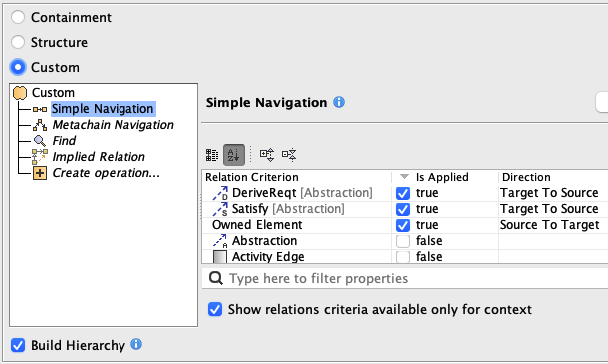
 - In the Query dialog, select Custom.
- Select Simple Navigation and set:
- DeriveReqt:
Is Applied: True
Direction: Target to Source - Satisfy:
Is Applied: True
Direction: Target to Source - Owned Element:
Is Applied: True
Direction: Source to Target
- Select the Build Hierarchy check box to recursively execute the specified expression for building a multilevel hierarchy starting from the scope as the root.
- Click OK.