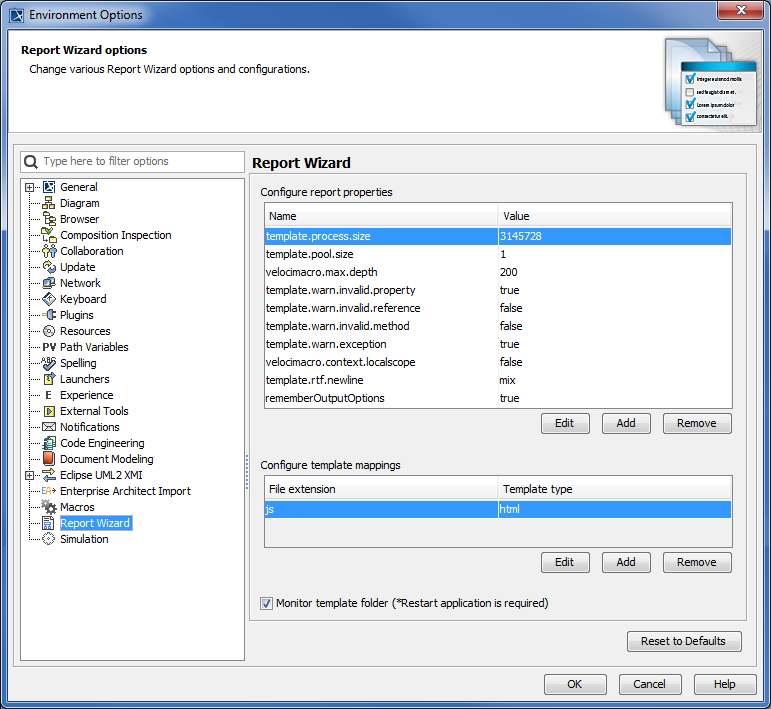
Modeling Tools General modeling features Report Wizard Configuring Report Wizard Report Wizard Environment options Current: Configuring report engine properties Configuring report engine properties You can configure the report properties of Report Wizard in the Environment Options dialog.The Configure report properties pane. Tip You can select a report property in the Configure report properties pane, and click to see its description. To edit, add, or delete a report propertyClick Options > Environment to open the Environment Options dialog.Select Report Wizard from the tree view to open the Configure report properties pane.Click: to edit a selected property name and value in the Report Properties dialog, and click . to create a property name and value in the Report Properties dialog, and click . to delete a selected property name and value from the Configure report properties pane. The following table lists the fields of the Report Properties dialog:Field Name Function Default Value Possible Value Required NameThe property name Blank Text Yes ValueThe property value Blank Text No DescriptionThe property description TextNo ×
 to see its description.