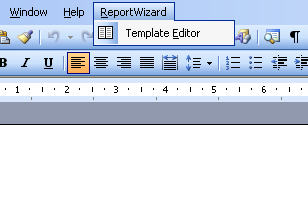
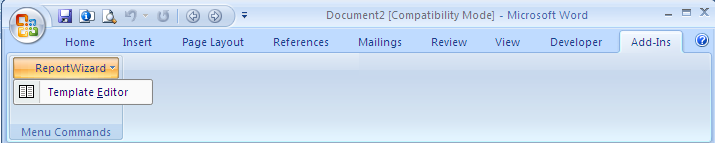
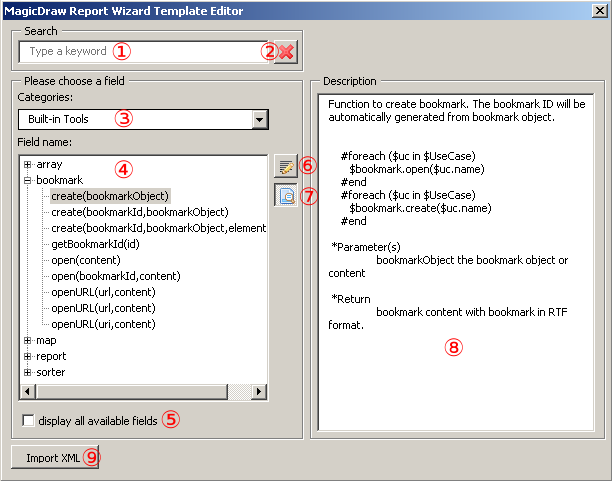
Modeling Tools General modeling features Report Wizard Report Wizard template editor Current: Opening template editor Opening template editor After installation has been completed, the Template Editor menu will appear on the Microsoft Word menu bar, see figure below.Microsoft Word 2003 Template Editor Menu.How to open Template Editor, eitherOn the Microsoft Word 2000 – 2003 menu, click ReportWizard > Template Editor, see figure above, orOn the Microsoft Word 2007 menu, click Add-Ins > ReportWizard > Template Editor, see figure below. Microsoft Word 2007 Template Editor Menu. The macro-enabled option in Microsoft Word is required to open Template Editor. When Template Editor is open, the Report Wizard Template Editor dialog will open.The Report Wizard Template Editor Dialog.The table below shows the Report Wizard Template Editor OptionsName Function Search boxFilter a list of fields. Only fields that contain a keyword of search as part of their names can be shown in the (4) List of fields. Clear search resultsClear the current search result.Categories combo boxSelect categories of fields. Fields are shown in (4) List of fields according to their categories.List of fieldsShow a list of fields. Double-click a field name to insert the code.Display all available fields check boxShow all fields, otherwise it will show only commonly used fields.Insert buttonInsert a code for a selected field into the document.Show/Hide description buttonShow or hide (8) description pane.Description paneShow the description of a selected field.Import buttonImport a data file. ×