The Capability Provision Creation Wizard is used to define a Capability Provision by one or more Resources at a specific period of time.
To open the Capability Provision Creation Wizard
- Open a CV-3 (DoDAF), StV-3 (MODAF), NCV-3 (NAF), Cr (NAF 4.0), or Strategic Phasing diagram (UAF).
- Select a Capability.
- Do one of the following:
- On the <viewpoint name> diagram toolbar, click Add New > Capability Provision.
- On the diagram pane, right-click the Capability and select Add New Capability Provision.
The Capability Provision Creation Wizard opens.
The wizard consists of three steps:
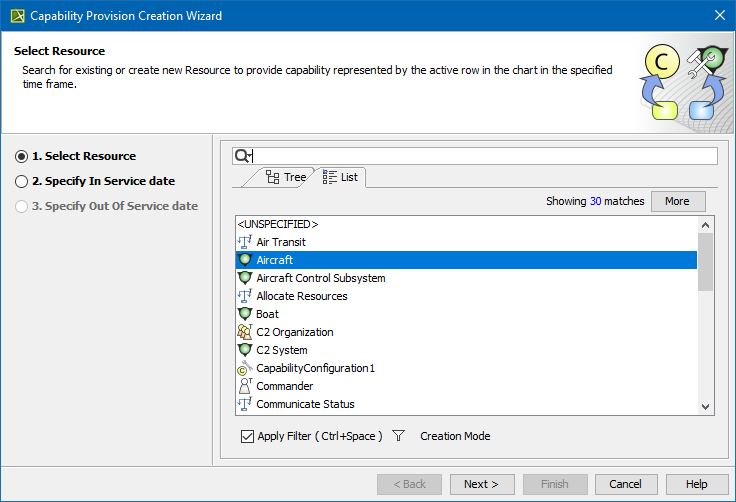
Resources selection
In this step, you can select the existing or create new Resources.
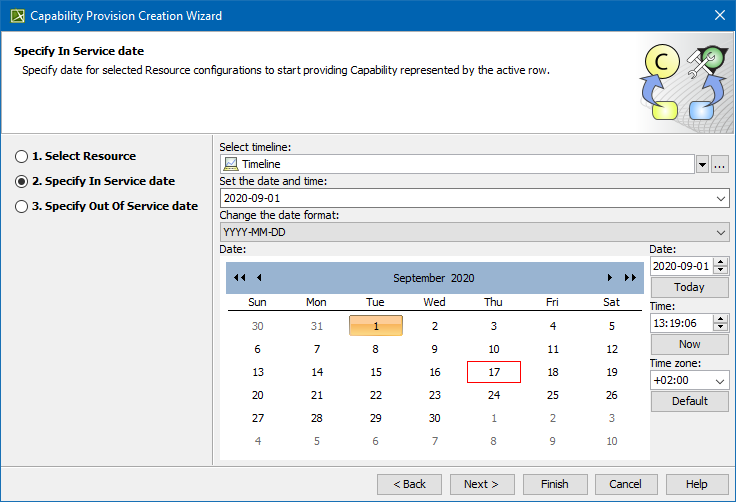
Capability service date specification
In this step, you can set the date and time, when the Resource should begin provisioning the Capability. The In Service Milestone is created.
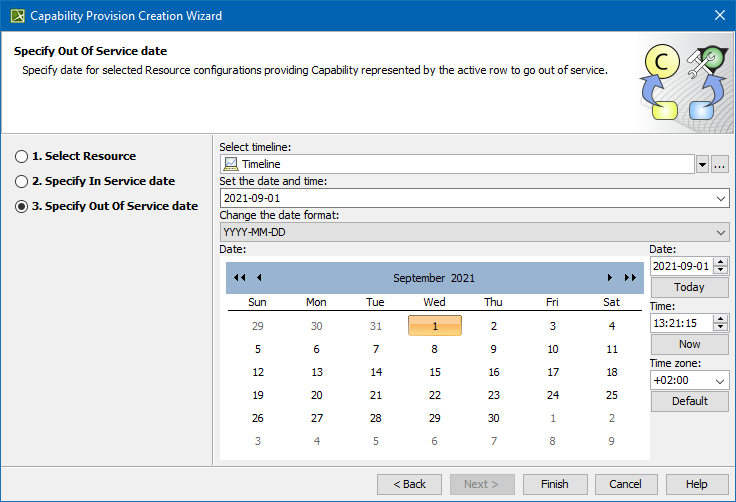
Out of service date specification (Optional)
In this step, you can specify when the Resource should stop provisioning the Capability. The Out Of Service Milestone is created. This step is optional. If you skip this step, the Capability exhibition bar on the chart will have a triangle ending.
Related diagrams
