A project is a physical working unit that consists of model, model visualizations (diagrams, tables, matrices, etc.), configuration data and references to other elements residing in used projects.
To create a project
Do one of the following:
Select File > NewProject.
On the main toolbar, click the NewProject button.
Press Ctrl+Shift+N.
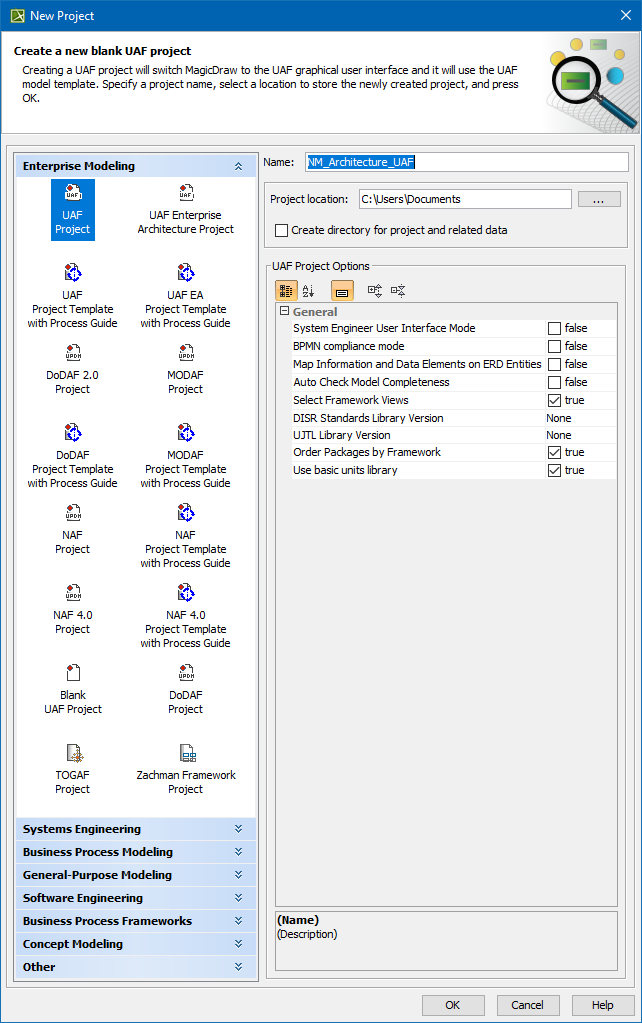
In the New Project dialog, under Enterprise Modeling, select theproject type you want to create.
Specify name, location, and other preferences if needed.
Click OK when you are done.
By default, UAF Project will be selected in the General property group. You can select any of the available Architectural Frameworks.
You can always change the Architectural Framework in the Project Options dialog General project options group.
When creating a new project, in the New Project dialog, you can choose which Framework views will be created and how will they be ordered.