To open the Realized Strategic Exchange wizard
- Do one of the following:
- On the diagram pane, select the Actual Enterprise Phase and on the smart manipulator toolbar, click  .
.
- Click  and on the diagram pane, connect Actual Enterprise Phases.
The Realized Strategic Exchange wizard consists of only one step:
Strategic Exchange creation
In this step, you create a new Strategic Exchange by specifying its name, conveyed Item, and direction of a Strategic Exchange.
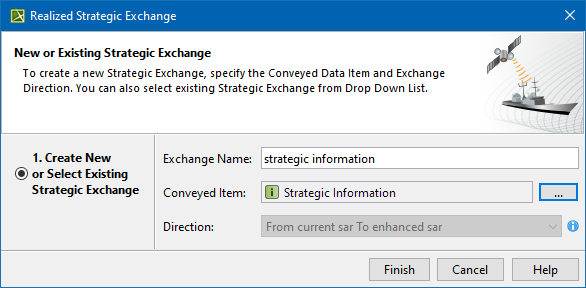
You can choose one or more Conveyed Items from the list or create new ones. When creating a new Conveyed Item, choose the type depending on the viewpoint:
| Viewpoint | Conveyed Item Type |
|---|
| Strategic | Strategic Information |
|---|
| Security | Security Enclave |
|---|
| Resource Mitigation |
| Resources | System |
|---|
| Software |
| Resource Artifact |
| Technology |
| Natural Resource |
Resource Service |
| Resource Architecture |
| Capability Configuration |
| Projects | Project |
|---|
| Personnel | Post |
|---|
| Responsibility |
|---|
| Person |
|---|
| Organization |
|---|
| Parameters | Geo Political Extent Type |
|---|
| Operational | Know Resource |
|---|