Adding Flight Phases and Indirect Assets
On this page
Basic Concepts
Flight phases
Flight phases are the distinct stages of an aircraft's operation from pre-flight to post-flight.
Indirect Assets
Indirect assets are external systems or components that are not part of the aircraft’s internal architecture, but can influence the aircraft’s behavior or security through interaction or data exchange.
Adding Flight Phases and Indirect Assets from the System Engineering Project
To add Flight Phases and Indirect Assets from the System Engineering Project to the Security Engineering Project
- Adding System Engineering Project to the Security Engineering Project.
- Drag and drop the Boarding flight phase from the Flight Phases package present in the 01 L1 Aircraft Level to the Flight Phases package present in the L1-Solution package.
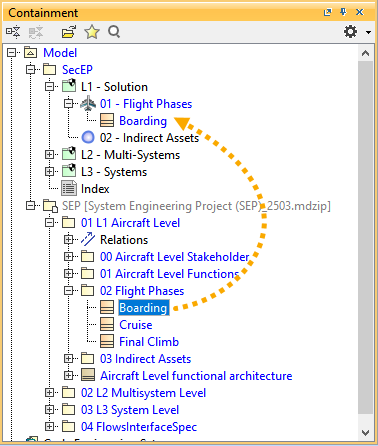
- Similarly, drag and drop the Maintenance crew indirect asset from the Indirect Assets package present in the 01 L1 Aircraft Level to the Indirect Assets package present in the L1-Solution package.
Adding Flight Phases and Indirect Assets from the DO-326A Profile
You can add the Flight Phases and Indirect Assets from the DO-326A Subject Library present in the DO-326A Profile. DO-326A Profile is an auxiliary resource; you must enable the Show Auxiliary Resources command to view it in the Containment tree.
To add Flight Phases and Indirect Assets from DO-326A Subject Library to the Security Engineering Project
- Drag and drop the APR - APPROACH flight phase from the Flight Phases package present in the DO-326A Subject Library to the Flight Phases package present in the L1-Solution package.
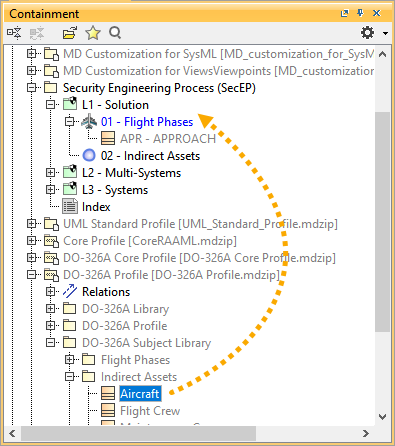
- Similarly, drag and drop the Aircraft indirect asset from the Indirect Assets package present in the DO-326A Subject Library to the Indirect Assets package present in the L1 - Solution package.
Adding Flight Phases and Indirect Assets in the Security Engineering Project
You can create a flight phase or indirect asset, either by creating a Class (UML element) or a Block(SysML element) based upon the Perspective selected in the modeling tool.
To add Flight Phases and Indirect Assets in the Security Engineering Project
- In the Containment tree, right-click L1-Solution package and select Create Element.
- In the dialog, expand General and select Package.
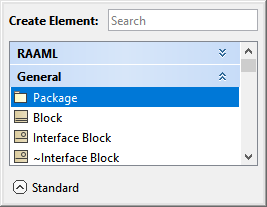
- Right-click the newly created Package and select Create Element.
- In the dialog, expand General and select Block.
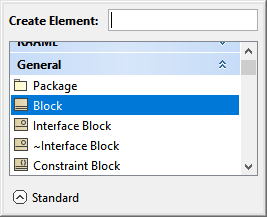
- Rename the newly created block as Top of Descent.
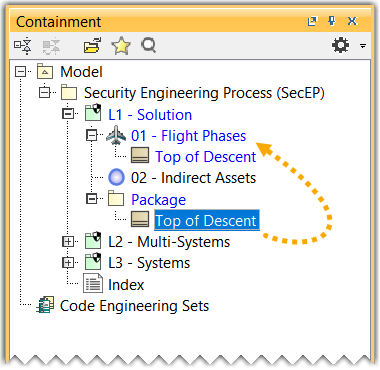
- Drag and drop the Top of Descent flight phase from the Package to the Flight Phases.
- Similarly, add the Indirect Assets in the Indirect Assets package.