Adding the System Engineering Project as a Used Project
To use a System Engineering Project(SEP), you must add the SEP by using the Project Usages command.
To add the System Engineering Project (SEP) as a Used Project
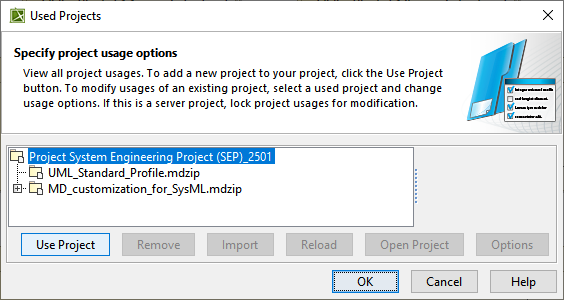
In the main menu, clickOptions > Project Usagesto open the Used Projects dialog.
In the Used Project dialog, clickUse Project.
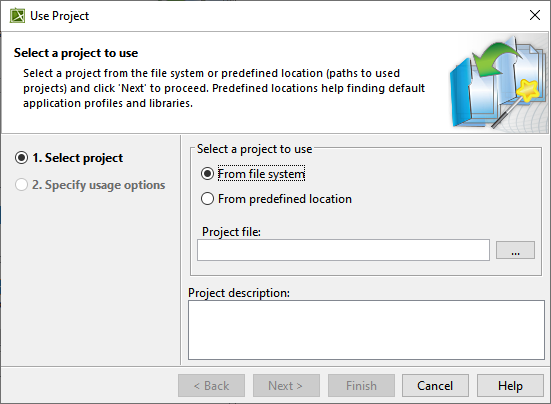
In the Use project dialog, select the Select project andFrom file system radio buttons, and click to open the Select a project to use dialog.
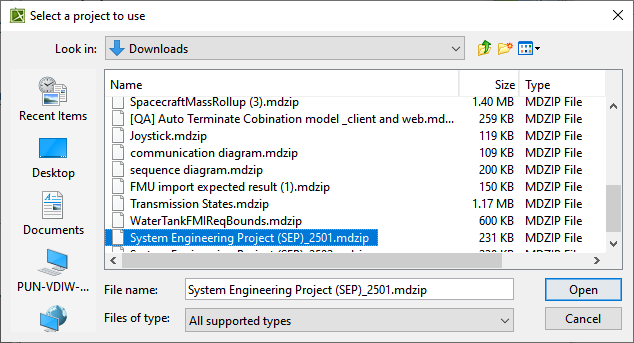
In the Select a project to use dialog, select the required System Engineering Project, and click Open.
Click Finish.
If you have disabled the Show Auxiliary Resources command in the Containment tree, a Question dialog appears to help you enable it. Click Yes to see the Auxiliary resources from the used projects.