Assigning Impact Ratings for a Threat Condition
To assign Impact Ratings to an Indirect Asset from the Security Impact Table
- Double-click the designated cell in any Threat Condition row and Impact on 'Flight Crew' column, and from the drop-down list, and select the required Impact Rating.
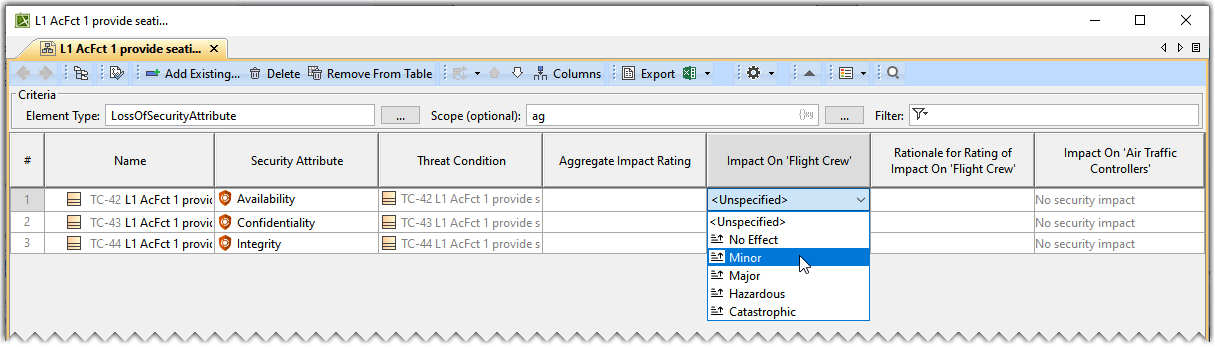
- The Aggregate Impact Rating is the highest Impact Rating value among all the Indirect Assets.
- You can assign a rationale for the assigned impact rating. Double-click the designated cell in any Threat Condition row and Rationale for Rating of Impact On 'Aircraft' column, and type in the required content.
Assigning Impact Ratings for a Loss of Security
To assign Impact Ratings to an Indirect Asset from the Security Impact Table after the extraction of a Loss of Security Attribute
- Double-click the designated cell in any Loss of Security Attribute row and Impact on 'Flight Crew' column, and select the required Impact Rating from the drop-down list.
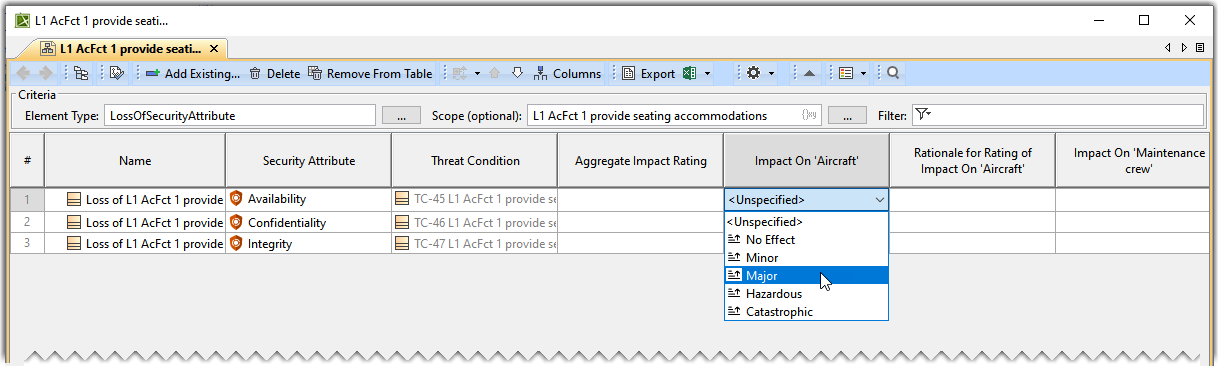
- The Aggregate Impact Rating is the highest Impact Rating value among all the Indirect Assets.
- You can assign a rationale for the assigned impact rating. Double-click the designated cell in any Loss of Security Attribute row and Rationale for Rating of Impact On 'Aircraft' column, and type in the required content.
