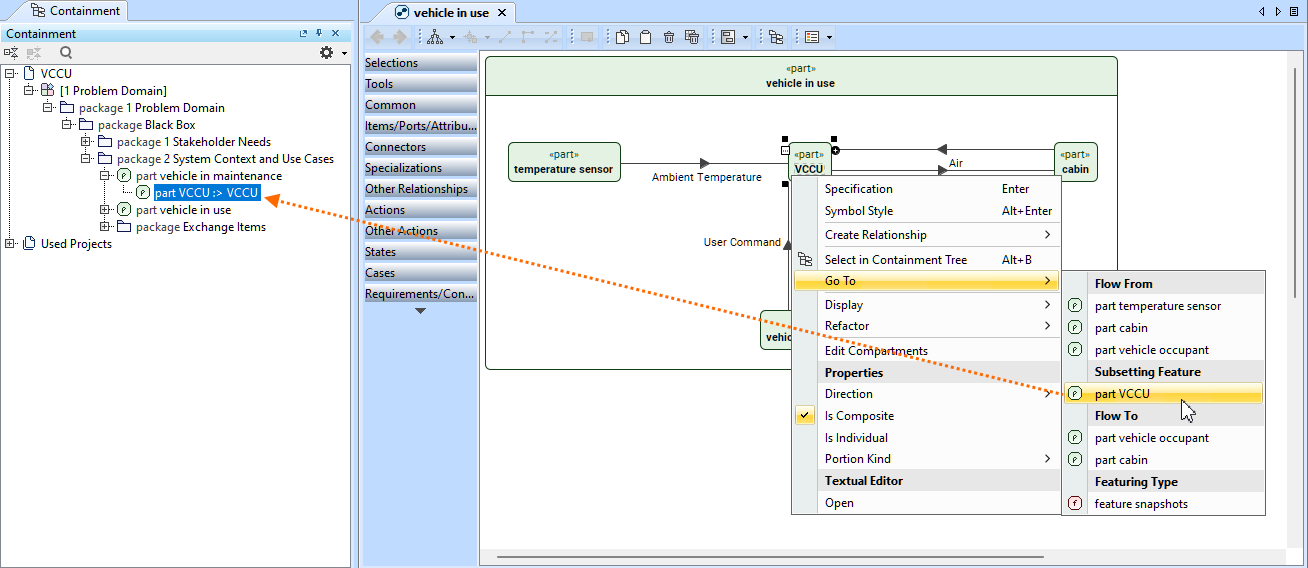
Use the Go To command in the element shortcut menu to navigate from one element to its related elements based on their relationships. In the Go To submenu, the related elements are grouped into categories indicating the relationships between elements, such as Flow, Connection, Type, Subsetted Feature, Redefined Feature, etc.
Navigating elements via the Go To command
To navigate elements via the Go To command
Do one of the following:
Right-click an element in the Containment tree or an element symbol on a view. In the shortcut menu, click the Go To command, and in its submenu, click the needed element.
Select an element in the Containment tree or an element symbol on a view. In the main menu, click Analyze, then Go To. In the submenu, click the needed element. The element is selected in the Containment tree.
If the Go To submenu contains more than twenty elements, it displays the Related Elements command that opens a submenu with the full related elements list.
The Go To command's submenu displays elements related to the vccu element. Clicking the 'part vccu' element under the Subsetting Feature category displays the vccu part element that subsets the vccu element for which the command was invoked.