The cross-version compatibility checking mechanism is triggered when a project with new feature usages is loaded with an older version of the modeling tool. The mechanism tracks feature usages of the 2026x Refresh1 and later Refresh versions, which results in the appearance of a Missing features detected notification in earlier modeling tool versions. The following table shows tracked features and the version they appear in. Projects can be committed/saved without any consequences.
| Feature name | Version |
Hierarchical table display mode and its persistence in the model. | 2026x Refresh1 |
Table column controls, including column order, sorting, width, and pinning persistence. | 2026x Refresh1 |
Tabular view columns with user-defined features. | 2026x Refresh1 |
Tabular views defined by an abstract view definition. | 2026x Refresh1 |
Referencing elements' (e.g., perform, include, satisfy, verify, etc.) representation as paths in views. | 2026x Refresh1 |
Compatibility of profiles
While the tool is backward compatible, we highly recommend that every user working on a particular project use the same version of the tool. For example, if you use an older version of the tool and open a project created with a later version, a balloon notification pops up:
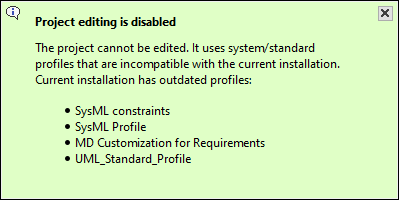
To avoid this:
- Make sure that every user working on the same project uses the same version of the tool.
- Do not migrate profiles unless every user working on the same project is informed and ready for migration.