Project options
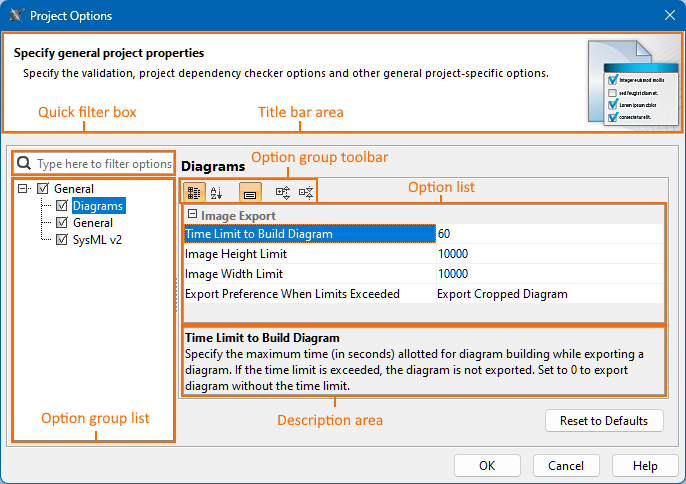
Use the Project Options dialog to specify general project-specific options. The Project Options dialog includes option groups, each designated for specific features and containing lists of corresponding options. Groups are represented using the tree structure.
Opening the Project Options dialog
To open the Project Options dialog
- In the main menu, click Options > Project.
Modifying project options
To modify project options
- Open the Project Options dialog.
- Locate the option you want to modify.

- Use the quick filter to find the needed option in the list. Filtering is performed in all available options, not only the selected option group.

- Click the Show Description button to display the project option description section at the bottom of the dialog to read about the option functionality.
- Use the quick filter to find the needed option in the list. Filtering is performed in all available options, not only the selected option group.
- An option value can be changed by typing a new value, setting a value to true/false, or selecting a value from the list.
Click the Reset to Defaults button to restore default option values.
- Click OK.
Project Options
The table below displays the default project options. Additional options may appear based on installed plugins.
| Option | Default value | Value options | Description |
|---|---|---|---|
| General | |||
| Diagrams | |||
| Image Export | |||
| Time Limit to Build Diagram | 60 | Number | Specify the maximum time (in seconds) allotted for diagram building while exporting a diagram. If the time limit is exceeded, the diagram is not exported. Set to 0 to export the diagram without the time limit. |
| Image Height Limit | 10000 | Number | Specify the maximum image height (in pixels) for diagram export. If the height limit is exceeded, the exported diagram is cropped, or the diagram is not exported at all, depending on the selected preference. Set to 0 to export the diagram without the image height limit. |
| Image Width Limit | 10000 | Number | Specify the maximum image width (in pixels) for diagram export. If the width limit is exceeded, the exported diagram is cropped, or the diagram is not exported at all, depending on the selected preference. Set to 0 to export the diagram without the image width limit. |
| Export Preference When Limits Exceeded | Export Cropped Diagram | Export Cropped Diagram Do Not Export | Specify the diagram export preference if the diagram image height and/or width limits are exceeded. |
| General | |||
| General | |||
| Path to Used Project | <project.dir> <install.root>\profiles <install.root>\modelLibraries | Custom | Specify the paths to store used projects and extension elements. |
| Decimal Places | 4 | Number | Specify the maximum number of decimal places to be used when displaying the real number in tables and element Specification windows. |
| SysML v2 | |||
| SysML v2 | |||
| Active View Creation Dialog | SysMLViewCreationDialog | Custom | Specify the Active Create View Dialog configuration. |