Redefinition
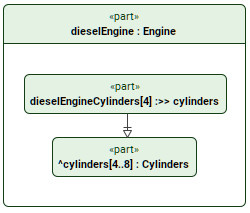
The redefinition relationship is a kind of subsetting used to replace an inherited feature by redefining.
Redefinition
Redefining a usage via the symbol shortcut menu in a view
To redefine a usage via the symbol shortcut menu in a view
- Right-click an inherited usage element symbol in a view and in the shortcut menu select Refactor, then Redefine.
Redefining a usage via the Textual Editor
To redefine a usage via the Textual Editor
- In the Textual Editor, identify the usage element that you want to be the redefining one.
- Follow the element name with either one of the following:
- keyword redefines
- textual symbol :>>
Follow the keyword with the name of the redefined usage element.
- Click the Synchronize button.
part def Engine {
part cylinders [4..8] : Cylinders;
}part dieselEngine : Engine {
part dieselEngineCylinders [4] :>> cylinders;
/* or */
part dieselEngineCylinders [4] redefines cylinders;
}
Redefining a usage via the Drag and Drop handler in a view
To redefine a usage via the Drag and Drop handler in a view
- Drag and drop an element from the Containment tree or use its symbol's Drag and Drop handler on an element symbol executing the Set Redefined Feature command.
Redefining a usage via the view palette
To redefine a usage via the view palette
- In the view palette, under the Specializations group, select redefinition.
- Draw the line with the arrowhead going from the redefining element to the inherited one.
Redefining a usage via the Create Relationship command
To redefine a usage via the Create Relationship command
- Right-click the element that you want to be the redefining one.
- In the shortcut menu, click Create Relationship, then in the submenu, click Outgoing, and then in the submenu, click redefinition. The Element Picker dialog opens.
- In the Element Picker dialog, do one of the following:
- In a view, click the element symbol you want to redefine. Hold Shift to select multiple elements.
- Click the Add
 button. The element selection dialog opens. In the element selection dialog, select the element you want to redefine and click OK.
 - Drag and drop the needed element you want to redefine from the Containment tree onto the Element Picker.
- In the Element Picker dialog, click OK.
Redefining a usage via the Specification panel
To redefine a usage via the Specification panel
- See the procedure Redefining inherited elements via the compartment in the Specification panel on the Specification panel page.