Specifying requirement verification usages for verification case objective
In addition to assumed and required constraint usages allowed in any requirement usage, the objective of a verification case may also have requirement verification usages, which indicate the requirements to be verified by the verification case. Since the requirement verification usage is a subrequirement of the objective, it is automatically considered a required constraint of its containing objective.
There are two ways a requirement verification usage can be specified for a verification case objective:
- by referencing the requirement usage defined elsewhere in the model.
- The element symbol is displayed with the verify keyword (unnamed element) or the verify requirement keyword (named element).
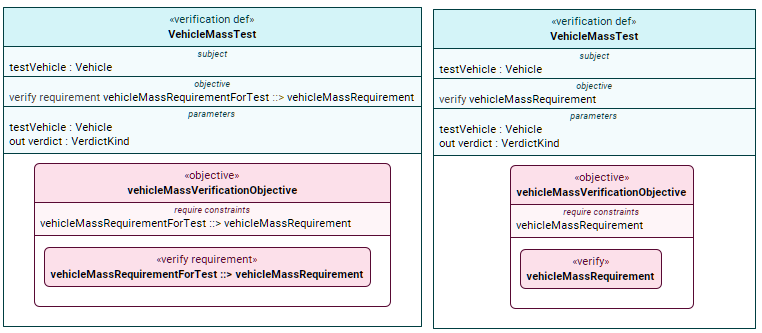
- See the procedures:
- The element symbol is displayed with the verify keyword (unnamed element) or the verify requirement keyword (named element).
- by containing an owned requirement usage, i.e., the verified requirement is the owned requirement usage itself.
- The element symbol is displayed with the verify requirement keyword.

- See the procedures:
- The element symbol is displayed with the verify requirement keyword.
Specifying requirement usages defined elsewhere in the model as requirement verification usages for verification case objective
Specifying requirement verification usages for verification case objective via the Textual Editor
To specify requirement verification usages for verification case objective via the Textual Editor
- In the Textual Editor, place the cursor within the curly braces of the verification case objective's body, do one of the following:
- For an unnamed requirement verification usage, declare the verify keyword followed by the name of the requirement you want to reference.
- For a named requirement verification usage, declare the verify requirement keyword, name the new usage, and then reference subset the requirement you want to reference.
- (Optional) Specify the requirement in the element's body.
- Click the Synchronize button.
requirement def VehicleMassRequirement {
//...
}
requirement vehicleMassRequirement {
subject vehicle : Vehicle;
in massActual :> ISQ::mass = vehicle.mass;
doc /* The vehicle mass shall be less than or equal to 2500 kg. */
require constraint {
massActual <= 2500[SI::kg]
}
}// step 1.a.
verification def VehicleMassTest {
subject testVehicle : Vehicle;
objective vehicleMassVerificationObjective {
verify vehicleMassRequirement; // unnamed requirement verification usage reference subsets another requirement usage
}
return verdict : VerificationCases::VerdictKind;
}// step 1.b
verification def VehicleMassTest {
subject testVehicle : Vehicle;
objective vehicleMassVerificationObjective {
verify requirement vehicleMassRequirementForTest ::> vehicleMassRequirement; // named requirement verification usage reference subsets another requirement usage
}
return verdict : VerificationCases::VerdictKind;
}
Specifying requirement verification usages for verification case objective via the owned verify requirement usage itself as the verified requirement
Specifying requirement verification usages for verification case objective via the Textual Editor
To specify requirement verification usages for verification case objective via the Textual Editor
- In the Textual Editor, place the cursor within the curly braces of the verification case objective's body, declare the verify requirement keyword, specify the element name, then the requirement body.
- Click the Synchronize button.
verification def VehicleMassTest {
subject testVehicle : Vehicle;
objective vehicleMassVerificationObjective {
verify requirement vehicleMassRequirement { // new verification case objective-owned requirement verification usage
subject vehicle : Vehicle;
in massActual :> ISQ::mass = vehicle.mass;
doc /* The vehicle mass shall be less than or equal to 2500 kg. */
require constraint {
massActual <= 2500[SI::kg]
}
}
}
return verdict : VerificationCases::VerdictKind;
}