Extract Definition and Usage
Extract Definition and Extract Usage commands improve feature reusability when the model grows to contain usage elements with repetitive features.
- The Extract Definition commands allow you to extract a definition element with the features of the usage element, allowing you to easily generate definition elements that can be used for typing other usage elements.
- The Extract Usage commands allow you to extract a usage element with the features of the usage element, allowing you to easily generate action, use case, and state usage elements that can be reused and adapted to different contexts.
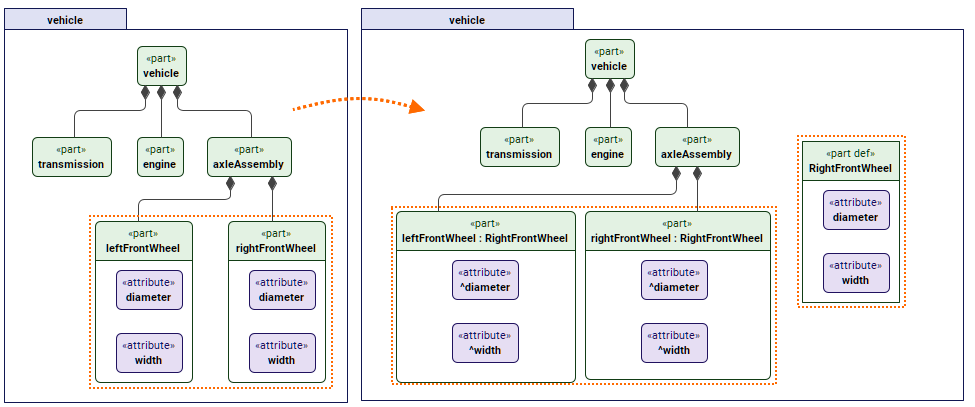 On the left: the same attributes diameter and width are each created for the parts leftFrontWheel and rightFrontWheel, resulting in duplicated elements that serve the same purpose.
On the right: once the Extract Definition command Extract All Features is executed on the rightFrontWheel element, the definition is extracted with the part's attributes.
The rightFrontWheel element is then defined by the extracted definition, inheriting its attributes. The leftFrontWheel part can then be defined by the definition as well.
Extract Definition commands
Extract Definition commands are:
- Extract All Features to extract a definition element with all of the usage's features.
- Extract Only Attributes and Parameters to extract a definition element only with attributes and parameters of the usage.
Once you execute the Extract Definition commands:
- The features, except for the redefined ones, are moved to the definition, which is then set as the type for the usage. All features that have been moved are then inherited instead of being owned by the usage.
To extract a definition element from a usage element
- Right-click a usage element(s) or its symbol(s). In the shortcut menu, click Refactor, then in the Extract Definition group, click one of the following:
- Extract All Features. The appropriate definition element is created.
- Extract Only Attributes and Parameters. The appropriate definition element is created only with the extracted attributes and parameters.
Extract Usage commands
You can also use the Extract Usage commands:
- Extract All Features to extract a usage element with all of the usage's features.
- Extract Only Attributes and Parameters to extract a usage element only with attributes and parameters of the usage.
The commands are especially useful when reusing and adapting actions, use cases, and states to different contexts.
Once you execute the Extract Usage commands:
- The extracted usage is owned by the same package and named after the element from which it was extracted;
- The extracting usage reference subsets the extracted usage;
- All owned features of the extracting usage are moved to the extracted usage, except for the redefined ones;
- All features that have been moved are then inherited instead of owned by the extracting usage.

The Extract Usage commands are only available for perform action, include use case, and exhibit state usage, unless they reference other elements.
To extract a usage element from a perform action usage, include use case usage, or exhibit state usage element
- Right-click a perform action usage, include use case usage, or exhibit state usage element(s) or their symbol(s). In the shortcut menu, click Refactor, then in the Extract Usage group, click one of the following:
- Extract All Features. The appropriate action, use case, or state usage element is created.
- Extract Only Attributes and Parameters. The appropriate action, use case, or state usage element is created only with the extracted attributes and parameters.