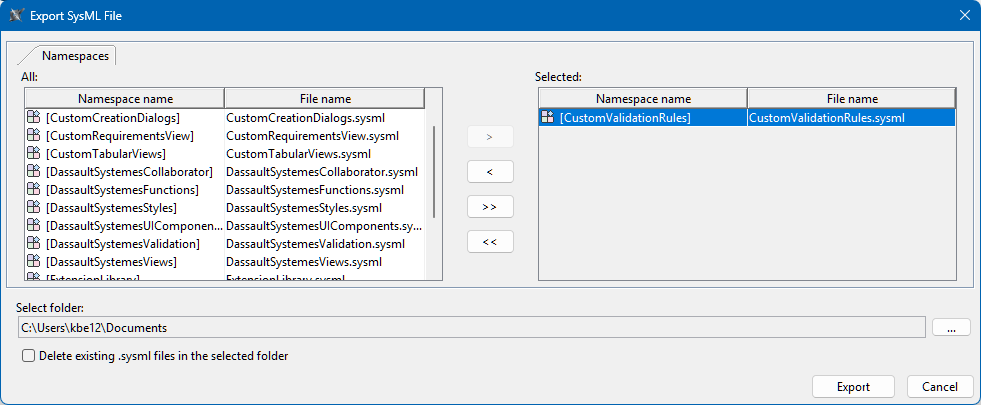
You can export SysML v2 project namespaces into .sysml textual notation files which you can later import into your projects.

The Smart Generation Timeout environment option allows you to specify the timeout duration for smart generation in seconds. During textual notation generation, the tool generates the shortest qualified names. If the timeout is specified, a simpler name is generated once the time limit is reached. Learn more on the (2026x Refresh1) Environment options page.

Exporting textual notation

To export textual notation


  1. Do one of the following:
    1. Export via File Menu:
      1. In the main menu, click File > Export To > SysML v2 Textual Notation. The Export SysML File window opens.
      2. In the Export SysML File window, in the All column, select the namespaces whose textual notation you want to export and click the Move button. 
    2. Export via Containment tree:
      1. In the Containment tree, select the root namespace(s) whose textual notation you want to export.
      2. Right-click the selected namespace(s) and in the shortcut menu, click Tools > Export to SysML v2 Textual Notation. The Export SysML File window opens.
  2. Review the selected namespace(s) in the Selected column.
  3. In the Select folder section, click the  button, and in the Select Folder window, select the location where the exported textual notation file will be saved. Click Select.
  4. (Optional) Select the Delete existing .sysml files in the selected folder check box to delete all .sysml files in the output folder upon export.
  5. Click Export.

Importing textual notation

Import supports:

  • Single file import
  • Multiple file import at once
  • Entire directory import

To import textual notation


  1. In the main menu, click File > Import From > SysML v2 Textual Notation. The Select SysML v2 Files window opens.
  2. In the Select SysML v2 Files window, select the .sysml file(s) you want to import and click Open. The selected file(s) are imported into separate root namespace(s).