Supported structural and connectivity elements
This chapter defines the structure concepts and connectivity supported by the simulation engine. It outlines how SysML v2 architectural elements are transformed from static definitions into dynamic, executable models, focusing on data propagation, interface contracts, and runtime validation.
Supported elements
The simulation engine supports execution of the SysML v2 structure elements listed in the table below.
In the Executable column, the following symbols mark whether elements are supported or not:
 - Supported elements
 - Partially supported elements
 - Unsupported elements
| SysML v2 Concept | Specification details | Executable | Notes |
|---|---|---|---|
| Part Def | PartDef |
| |
| Part Usage | Part Usage |
| |
| partUsage : PartDef |
| ||
| partUsage :>> partUsage |
| ||
| partUsage :> partUsage |
| ||
| partUsage [1..*] ordered nonunique |
| ||
| ref partUsage : PartDef |
| ||
| partUsage_1 = partUsage_2 |
| ||
| Port Def | port def FuelingPort {
attribute flowRate : Real;
out fuelOut : Fuel;
in fuelReturn : Fuel;
} |
| The simulation does not check the direction of a directed Feature, meaning the payload is transferred without verifying if it complies with the port definition |
| Port Usage | portUsage : PortDef |
| |
| portUsage : ~PortDef |
| ||
Nested portsport p0 : PortDef {
port p1 : PortDef;
port p2 : PortDef;
port p3 : PortDef;} |
| ||
| Connection Def | connection def ConnectionDef1 { end part end1 : Part1; end part end2 : Part2; } |
| |
| Connection Usage | connection connection1 :ConnectionDef1 connect part1.port to part2.port; |
| All ConnectionUsage functions as delegation. |
| Connection (n-ary{}with 3 ends) connection connection1 : ConnectionDef1 connect (part1,part2, part3); |
| ||
| Binding Connection | binding bind attributeUsage = attributeUsage; |
| Binding works only between attribute usages of primitive types. |
| Interface Def | interface def ControlToTankInterface { endp1 : ~ValvePort; endp2 :ValvePort; } |
| If a flow is specified between attribute usages of primitive types, the value flows according to the specification. |
| Interface Usage | interface : ControlToTankInterface connect controller.valvePort to waterTank.valvePort; |
| All InterfaceUsage functions as a delegation. |
| Flow | interface def ControlToTankInterface { endp1 : ~:ValvePort; endp2 :ValvePort; flow from p1.valve to p2.valve; } |
| Flows are supported only when specified in the Interface Definition |
| Attribute Def | attribute def Dimensions { attributelength :Real; attributewidth :Real; attributeheight :Real; } |
| |
| Attribute Usage | attributeUsage:ScalarValues::Real |
| Only primitive type (Integer, Real, String, Boolean) Units are not supported. |
| attributeUsage : EnumerationDef |
| ||
| attributeUsage:mass |
| Units are not supported. | |
| attributeUsage = expression |
| ||
| attributeUsage := expression |
| ||
| attribute:AttributeDef |
| ||
| attribute:AttributeDef [1..*] |
| ||
| Enumeration | enum def EnumerationDef1 { enum enum1; enum enum2; } |
| |
enum def EnumerationDef1 { enum = value1[unit1]; enum = value2[unit2]; } |
|
Connectivity
Connectivity in SysML v2 simulation moves beyond static structural definitions to specify how elements dynamically interact during execution. The simulation engine enforces strict rules for data exchange, payload routing, and state synchronization to ensure model fidelity.
Interfaces
Interfaces serve as the formal contract between structural parts. They define the structured interaction points where data, energy, or material (modeled as flowUsages) cross system boundaries.
Key Applications:
- Component Decoupling
Define how components interact (ports and flows) without being dependent on their internal state machine logic or private behaviors. - Automated Data Propagation
Ensure that a value change in a source component is automatically reflected in the connected target component. - Payload Routing
Facilitate the movement of discrete messages or physical items through defined ports.
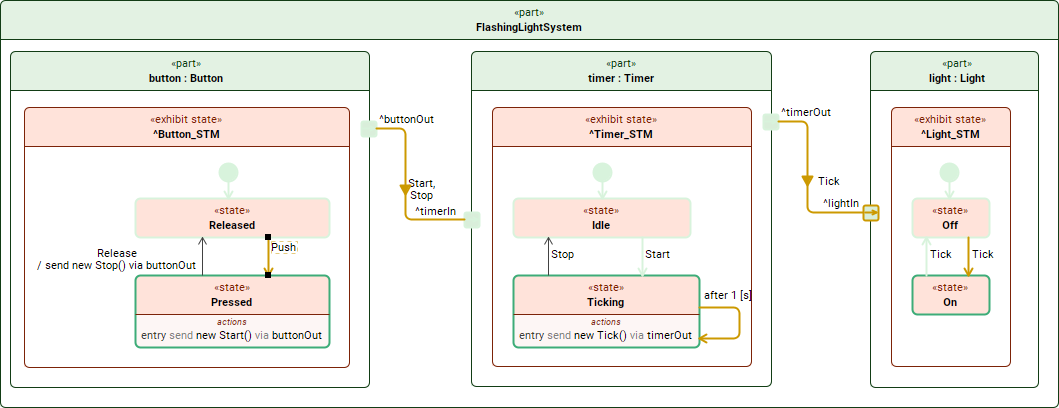
Simulation of the FlashingLightSystem part usage.
interface def ButtonToTimerInterface {
end p1 : ButtonPort;
end p2 : TimerInPort;
flow of Start from p1.start to p2.start;
flow of Stop from p1.start to p2.start;
}
// Usage in a system context
interface : ButtonToTimerInterface connect button.buttonOut to timer.timerIn;

Flows
The simulation engine executes flow usages defined within an interface definition. The behavior of these flows follows specific operational semantics:
- Data Transfer (Non-Destructive)
By default, transfers are executed as a copy operation. The source value remains intact while an identical instance is propagated to the target (isMove = false). - Propagation Trigger (Push)
Value transfer is reactive. It is initiated immediately upon an update to the source property (isPush = true).
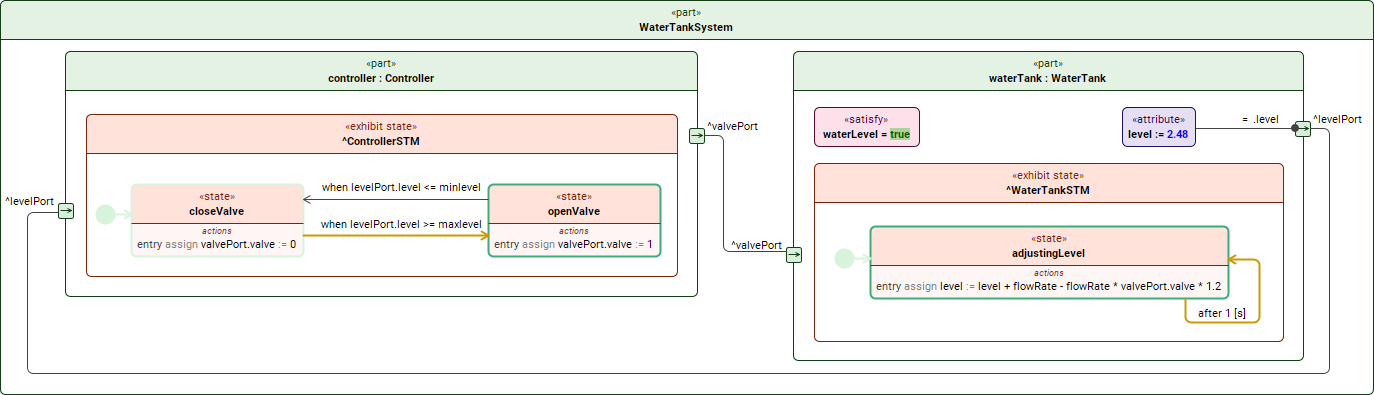
Simulation of the WaterTankSystem part usage.
interface def ControlToTankInterface {
end p1 : ~PortDefs::ValvePort; // Conjugated port (source)
end p2 : PortDefs::ValvePort; // Standard port (target)
flow from p1.valve to p2.valve; // flow
}
// Usage in a system context
interface : ControlToTankInterface connect controller.valvePort to waterTank.valvePort;
Binding connections
Binding connectors are utilized to map specific primitive FeatureValues directly to one another. This ensures that two features always share the same value throughout the simulation lifecycle.
part def Vehicle {
attribute mass;
part engine {
attribute engineMass;
}
// Binding the engine's mass attribute to a local feature
bind engine.engineMass = mass;
Runtime error handling
To ensure model integrity, the execution engine enforces strict rules during value assignments. Violations result in informative messages in the Simulation Console
| Condition | Engine Action | Console Info Message |
|---|---|---|
| Bound Value | Assignment skipped | [Feature] := [Value] - failed because the value is bound. |
| Incompatible Type | Assignment skipped | [Feature] := [Value] - failed due to incompatible types. |
| Real to Integer | Value is trimmed at the "." | [Feature] := [Value] - value changed from Real to Integer. |
Visual Execution Tracing
The simulation provides real-time visual feedback to help users trace the path of payloads and data.
- Visited/Last Visited
When a payload is transferred via a port usage, the entire path—from the source port, through the connection/interface, to the destination—is highlighted. - Handling Ambiguity
If a port has multiple outgoing connections/interfaces and the specific target is not pre-defined, the engine annotates all possible paths and connectors to signify potential interaction routes.