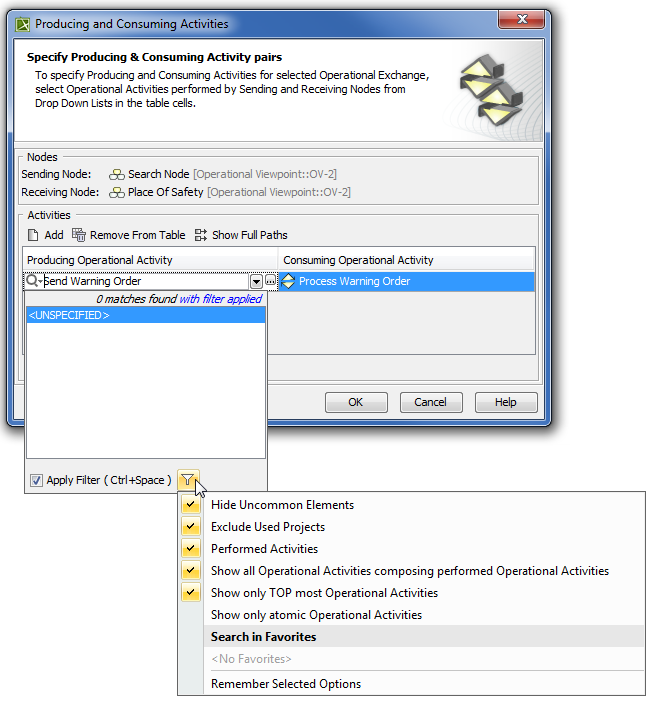
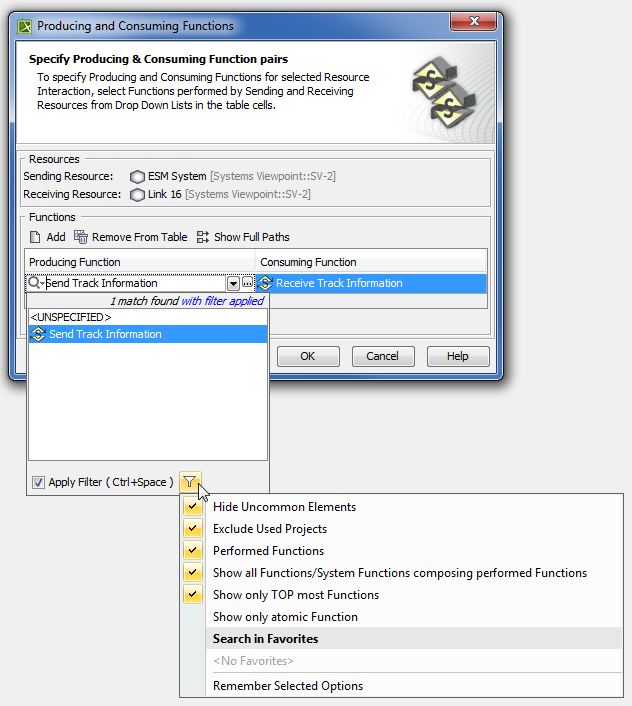
UPDM 2 Procedures Current: Filtering Operational Activities and Functions Filtering Operational Activities and Functions Use to filter the activities and functions according to your needs in the:Producing and Consuming Activities dialog. Producing and Consuming Functions dialog.Filtering Operational ActivitiesFilter OptionFilter allows the selection of...Performed Activities The Activities that are performed by the Node.Show all Operational Activities composing performed Operational ActivitiesThe Activities that are the composite parts of directly performed Activities.Show only TOP most Operational ActivitiesTOP most Activities.Show only atomic Operational ActivitiesThe Activities that are composite parts of other Activities and do not have composite parts.Filtering FunctionsFilter OptionFilter allows the selection of...Performed FunctionsThe Functions that are performed by the Resource.Show all Functions/ System Functions composing performed FunctionsThe Functions that are the composite parts of directly performed Functions.Show only TOP most FunctionsTOP most Functions.Show only atomic FunctionThe Functions that are composite parts of other Functions and do not have composite parts. To apply filtersSelect appropriate options from the drop-down list. For the more concrete element selection, use different combinations of these filters. Related procedures Producing and Consuming Activities dialogProducing and Consuming Functions dialog ×