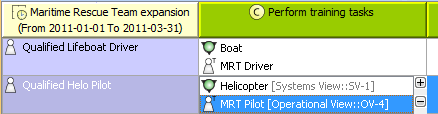
UPDM 2 DoDAF 2.0 viewpoints and views Capability viewpoint CV-5 Capability to Organizational Development Mapping Current: Modifying CV-5 table Modifying CV-5 table To add/ remove Capabilities in/from a CV-5 tableIn the table toolbar, click the Add/ Remove Columns button.In the Select Capability dialog, choose Capabilities to add or remove them from a table.Click OK when you are done. Capabilities are removed only from the table. They are not removed from the model.A Capability of Performer relationship between the context element and a removed Capability is removed from the model.A Capability of Performer relationship between the context element and an added Capability is added in the model. To add/ remove Resources in/from a CV-5 tableClick the cell you want to edit.The + and - buttons appears at the right of the cell.Do one of the following:To add a Resource, select a Resource and click the + button . The Deployment Milestones wizard opens.To remove a Resource, select a Resource and click the - button. For more information about table management, see Managing Tables. ×