Magic Cyber Systems Engineer / Cameo Systems Modeler
Released on: June 26, 2026
The 2026x Refresh1 release introduces multiple improvements to SysML v1 modeling, simulation, and client-side collaborative modeling capabilities.
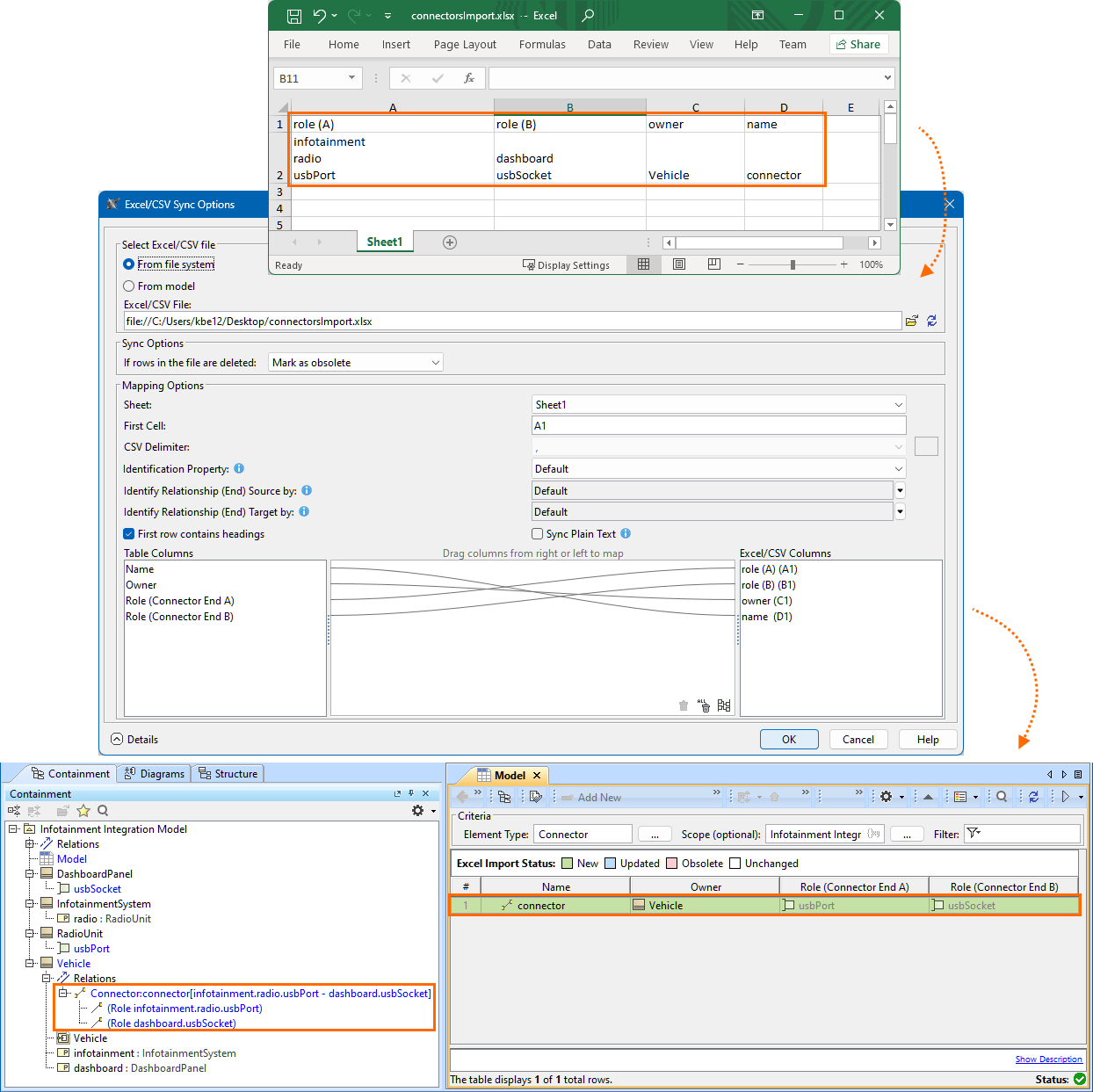
SysML v1 modeling now offers enhanced import from Excel files, supporting nested connectors.
Model simulation improvements include instance selection for behavioral diagrams, allowing you to filter animation for a single object in State Machine, Activity, and Sequence diagrams. In addition, UI mockups now support unit symbols, and a new Show Units property lets you control whether units are displayed in diagrams and mockups.
In client-side collaborative modeling, Partial Project Usages is now out of the technology preview phase and offers a smoother user experience for defining usage scope. Additionally, the feature for saving projects to an earlier version has been improved so that all used projects are saved together with the open project, and Teamwork Cloud projects can now be saved to an earlier version as .mdzip files.
SysML v1 Features
Nested Connector Import
Import from Excel files has been enhanced to support nested connectors. You can now define connectors between elements located at different levels of the model structure, and the tool will automatically construct the corresponding nested connector paths during import. This improvement enables accurate reconstruction of complex internal structures directly from external data sources, reducing manual adjustments and improving modeling efficiency. Learn more >>
Simulation Features
Instance Selection in Behavioral Diagrams
The 2026x Refresh1 version of the plugin allows you to filter animation for one specific object in State Machine, Activity, and Sequence diagrams. If several instances of the same behavior exist, the diagram automatically shows animation only for the first instance annotated in the diagram. This prevents the diagram from merging events from multiple concurrent instances and improves clarity during simulation analysis. You can switch the displayed instance from the contextual menu.
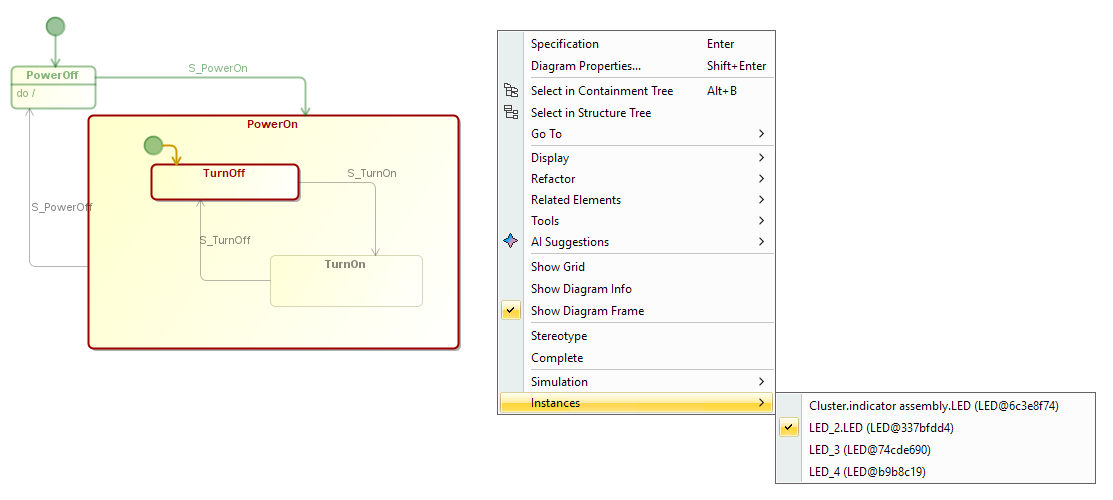
Selecting the Instance to be animated in a State Machine Diagram.
UI Mockup Improvements
This release introduces the ability to display the unit symbol in UI mockups. In addition, a new Simulation Configuration property — Show Units — allows you to control whether units are displayed in diagrams and UI mockups.
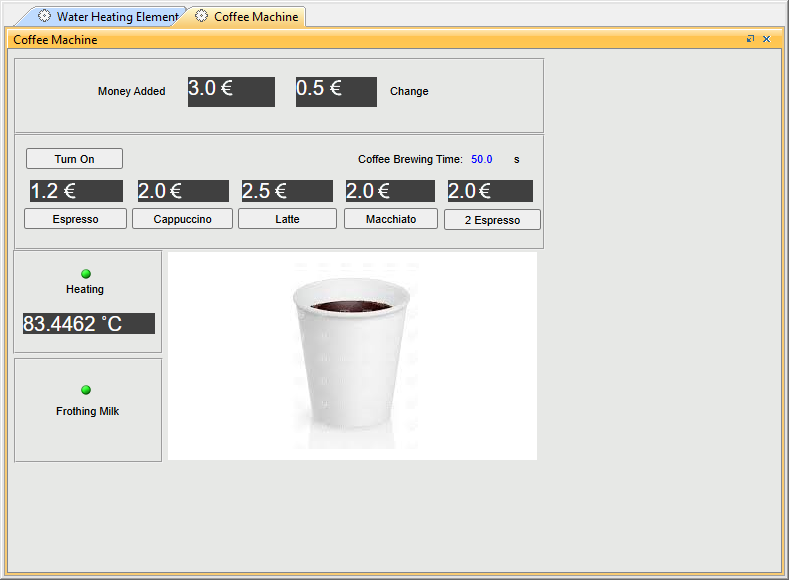
Displaying units in UI mockups
Other Improvements
- Time Series and Timeline Charts now support negative time values.
- UI mockups, graphs, and other elements generated during model execution are displayed with an automatic offset, making them easier to rearrange. In addition, the adjusted layout is now preserved between execution runs.
Collaboration in Teamwork Cloud
Partial Project Usages
We are excited to announce that Partial Project Usages is now out of the technology preview phase, featuring a significantly improved overall user experience. As in previous releases, the feature allows you to define the usage scope by selecting a specific part of a project, and enables seamless switching between full and partial usages as well as easy adjustment of the usage scope at any time.
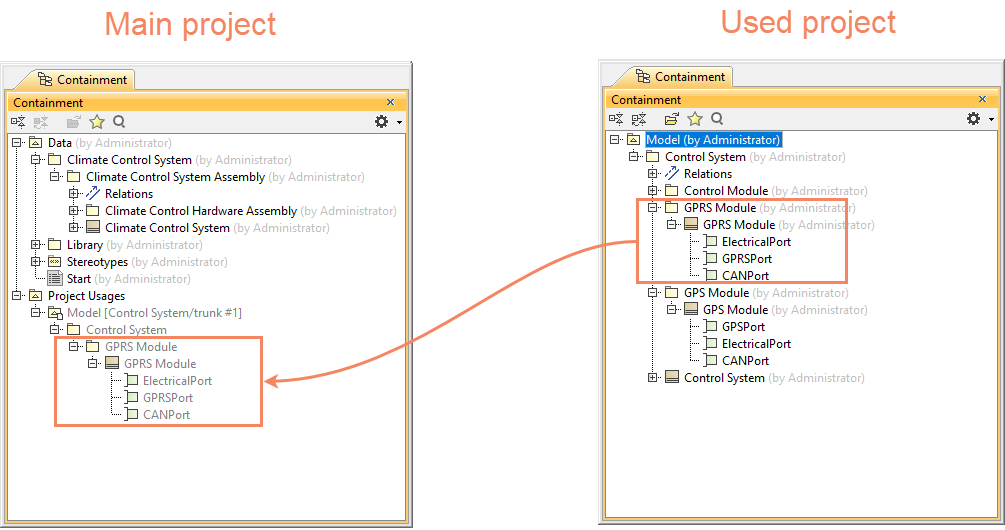
Partial project usage
Saving Projects to an Earlier Version
The previous release introduced the ability to save projects to an earlier major version—for example, from version 2026x to 2024x—making it easier to collaborate with teams using older versions of the modeling tool.
In version 2026x Refresh1, this functionality brings the following improvements:
- If your project uses other projects, all used projects are saved together with the open project.
- You can now save Teamwork Cloud projects to an older version as .mdzip files without first saving them locally.
SysML v2 Project Migration to Version 2026x Refresh1
The new release supports several options for migrating SysML v2 projects to version 2026x Refresh1. You can migrate all or selected projects on the Teamwork Cloud server in bulk via the Collaborate menu, or migrate standalone Teamwork Cloud or local repository projects by opening them and agreeing to update standard libraries.