Cameo DataHub
Released on: November 28, 2025
SysML v2 Support
You can now use the Copy Data operation in Cameo DataHub with DOORS, DOORS Next (DNG), JAMA Connect, and ENOVIA Requirements connectors without support for links. Standard properties, such as Declared Name and Documentation Body, are available for mapping. The SysML v2 support is available for evaluation purposes, and the DataHub team will continue adding new SysML v2 capabilities in upcoming feature-plugin releases.

- You must restart the modeling tool to switch between SysML v1 and v2.
To learn more about enabling the SysMLv2 support, click here.
ENOVIA Requirements
New Environment Options
The Show All Elements, Show Ownership, and Show Revisions options are now added in the ENOVIA Requirements section of the Environment Options dialog. To learn more about the newly added environment options, refer to the ENOVIA Requirements page.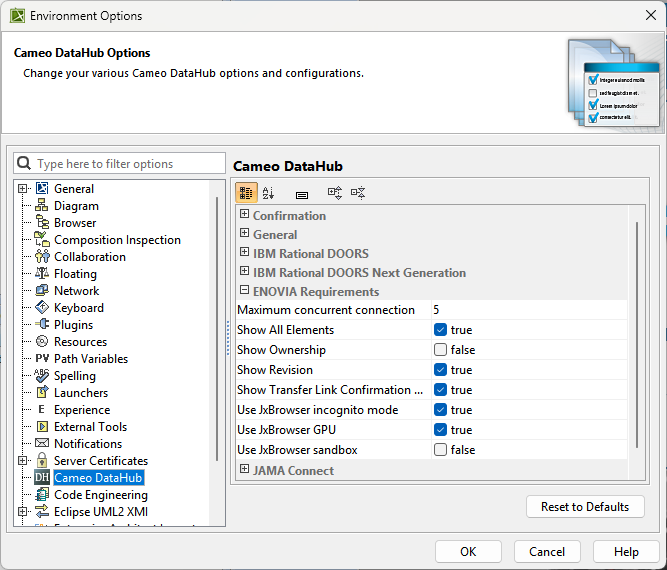
The newly added Show All Elements, Show Ownership, and Show Revisions options present in the Environment Options dialog.
Other Improvements
All requirement domain-related objects are now available on the CDH Explorer panel for you.
Support for customized Chapters objects is enabled. All the ENOVIA Requirements custom data types are now available.
Synchronization links rerouting to a new revision are enabled. When the revised object is replaced on the platform side, synchronization links are rerouted to the replaced object automatically when synchronization is initiated for the revised object for the first time. When the revised object is not replaced, link rerouting is initiated manually by selecting the command on the contextual menu.
Significant data synchronization performance improvements delivered.
Performance Improvements
Operations related to below below-mentioned activities have been improved. The following table presents a performance comparison of the time taken to perform various activities on a set of 1000 requirements organized in a flat hierarchy:
Sr. No. | Action | 2024xR2 | 2026x |
1 | Opening a local MSOSA project | 17 Seconds | 11 Seconds |
2 | Logging into ENOVIA Requirements | 10 Seconds | 9 Seconds |
3 | Launching ENOVIA Requirements | 349 Seconds | 39 Seconds |
4 | Using the Show all elements command | 220 Seconds | 45 Seconds |
5 | Expanding the ENOVIA node | 200 Seconds | 52 Seconds |
Roadmap
The upcoming Cameo DataHub releases will add support for relationships, custom types, and additional operations for SysMLv2.