2026x Hot Fix 1
CATIA Magic / No Magic Modeling Tools
Released on: December 19, 2025
2026x Hot Fix 1 is now available for CATIA Magic and No Magic portfolios. It includes a number of improvements, bug fixes, and vulnerability fixes in our modeling tools and server products.

Hot Fix version compatibility
The version and Hot Fix number of a modeling tool and its plugins must be the same. After installing the Hot Fix version of a modeling tool, select the same Hot Fix version when downloading its plugins. The modeling tool will not work correctly if you install plugins of a different version and/or Hot Fix number.
SysML v2 Features
Local Project Management Improvements
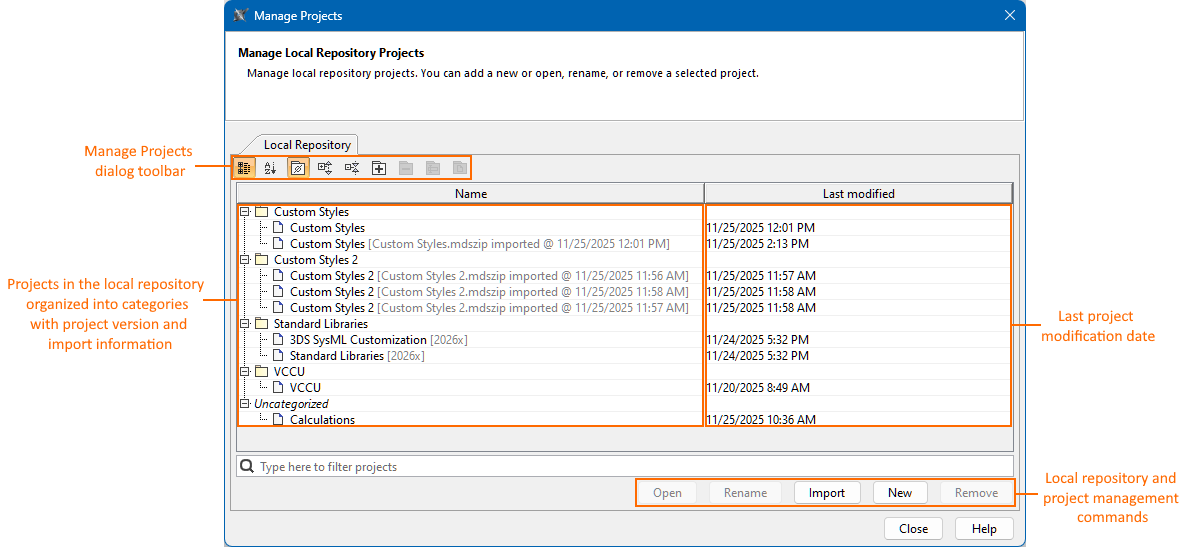
The Manage Projects Dialog Simplification
The Manage Projects dialog has been improved by removing redundant buttons and reducing the number of displayed columns. Project version and import details are now displayed within the Name column. These enhancements deliver a cleaner, more intuitive interface and a smoother project-management experience within the local repository. Learn more >>
Project Naming Improvements in the Local Repository
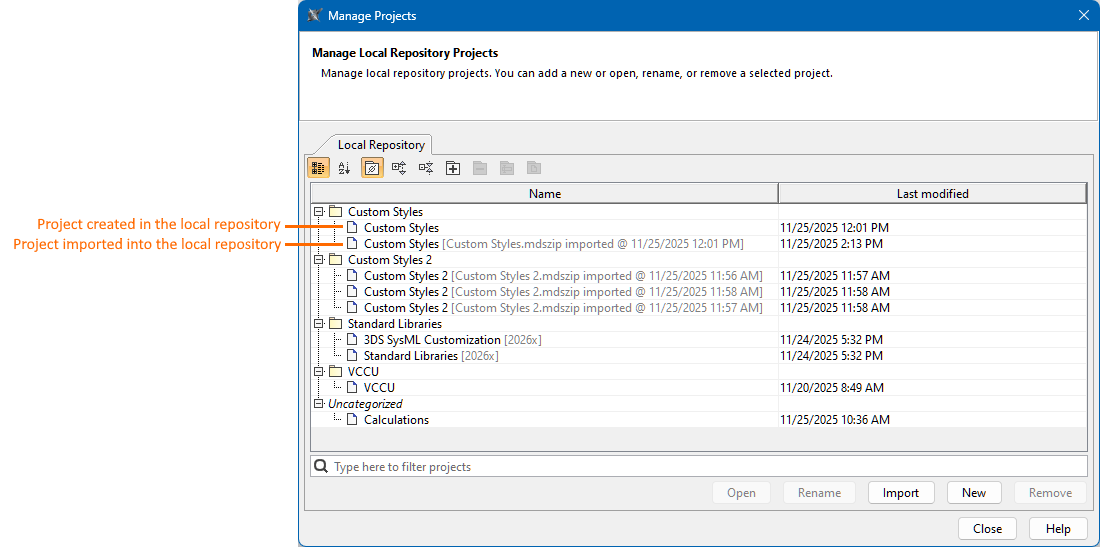
Updates have been introduced to project naming in the local repository. Updates have been introduced to project naming in the local repository.
- Projects created in the local repository are now displayed only by their project name.
- Imported projects are displayed using the following structure: [<file_name>.mdszip imported @<date and time of the import>].
This update provides more precise and informative details at a glance. Learn more >>
Other Improvements
- Local repository performance. First-time project opening (while building local caches) is now up to 20% faster. Subsequent openings are up to 10 times faster.
- Local repository optimization. Previously saved but unused project versions are now automatically removed on each save, preventing unnecessary local repository growth.
- Simplified project saving in the local repository. The distinction between saving a project as a draft or a new version has been removed. The unified Save Project command now simply saves the project as the latest version in the local repository. Learn more >>
- Removing the original project vs. its subsequent imports from the local repository. While removing the original project from the local repository removes all subsequent imports of the same project, removing any subsequent import of the same project no longer affects the original project. Learn more >>
Local Used Project Management Improvements
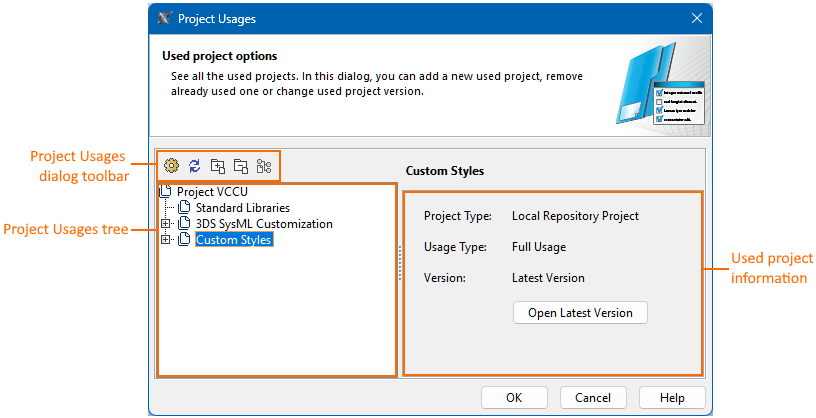
The Project Usages Dialog Simplification
The Project Usages and Advanced Project Usages Configuration dialogs have been improved by removing any redundant buttons. The Advanced Project Usages Configuration dialog now also displays fewer columns. These improvements provide a cleaner interface and a more efficient used project management experience within the local repository. Learn more here >> and here >>
Improved Workflow for Updating Used Projects
The workflow for updating used project versions has been redesigned. In the main project, an outdated used project may refer to two of its available versions: Older Version or Latest Version. You can choose to update the used project to its latest version via the Switch to Latest Version command or continue using the older one. This simplified workflow makes updating used projects faster, clearer, and more efficient. Learn more >>

Improved Workflow for Switching Between the Original Used Project and Its Subsequent Imports
You can now easily switch between the original used project and its subsequent imports via the Switch To command.
- The Switch To menu displays the used project originally created in the local repository by indicating the project name and version (Latest/Oldest Version).
- Subsequent imports of the project are displayed using the structure: <[<file_name>.mdszip imported @<date and time of the import>] <version (Latest/Oldest Version)>>.
This new workflow separates switching between imports from updating to the latest version, offering a clearer and more intuitive experience. Learn more >>

Performance Improvements
- The 2026x HotFix1 release delivers significantly improved model synchronization performance in the Textual Editor, providing approximately a 40% speed increase in the local repository and Teamwork Cloud.
- Projects in the local repository now open up to 20% faster on the first load and up to ten times faster after caching.
- Projects in Teamwork Cloud are updated up to two times faster.
Improvements and Bug Fixes
SysML v2
SysML v2 Plugin
- The issue where integrity errors appeared after project creation has been fixed.
- The issue of incorrect implied subsetting for the result of the Index and Select expressions has been fixed.
- The issue of incorrect implied subsetting for a feature with a FeatureValue has been fixed.
- The issue where importing a .sysml file with an exposed dependency caused errors has been fixed.
- The issue where connectors were not displayed for an element symbol after executing the ‘Display Connectors’ command if another symbol already displayed those connectors has been fixed.
- The issue where default style property values for views were not saved has been fixed.
- The issue where the isMultiline column attribute was ineffective for tabular views has been fixed.
- The issue where a ref keyword was added to each element created from the view palette and nested inside an element symbol has been fixed.
- The issue where navigation in the Textual Editor caused an error has been fixed.
- The issue where a single ‘Undo’ command undid two previous paste commands instead of one in the Textual Editor has been fixed.
- The issue where the modeling tool became unresponsive during operation finalization after editing in the Textual Editor has been fixed.
- The issue where the Textual Editor reported an incompatibility with the textual notation for transitions using a send action has been fixed.
- The issue where the ‘Use Server Project’ command redirected to local repository management has been fixed.
- The issue where the ‘Recent Server Projects’ command displayed local repository projects has been fixed.
- The issue where predefined library used projects were available for selection when branching used projects in Teamwork Cloud has been fixed.
- The issue where the project import to the Local Repository fails has been fixed.
- The issue where the default style is not applied to nested views has been fixed.
SysML v2 Evaluation Plugin
- The issue where the features with multiplicity of more than 20 are evaluated incorrectly has been resolved.
- Evaluation performance has been improved.
- The issue where an HTML table is generated with an invalid context specified has been fixed.
- The issue where feature names could be edited in a generated HTML table has been fixed.
SysML v2 REST API
- Improved getElements service performance on initial invocation.
- SysML v2 API Query service now supports queries with derived properties upon indexing projects in ElasticSearch.
Collaboration
- Users without the required clearance level will no longer be able to open projects with data markings and remove all references.
Magic Software Architect / MagicDraw
- The issue where it was allowed to copy and paste a table cell, resulting in elements with identical names, has been fixed.
- Issues related to tagged value export to Eclipse UML2 have been fixed.
Collaboration in Teamwork Cloud
- The issue causing duplicated data after updating used projects has been fixed.
- The issue where removing underlying model references did not fully work has been fixed.
- The issue where projects branched together with used projects still use the original (non-branched) used projects has been resolved.
Collaboration powered by the 3DEXPERIENCE platform
- The issue where model merge was sometimes failing in the 3DEXPERIENCE Cloud environment has been fixed.
- The issue that causes an error when trying to use a server project and select a specific project iteration has been fixed.
- The issue where not all related standard profiles are added to the 3DEXPERIENCE platform together with a BPMN2 project has been fixed. The issue only occurred when a modeling tool with the UPDM plugin was used.
- Several issues related to standard profile migration from version 2024x to version 2026x have been fixed.
Magic Systems of Systems Engineer / Cameo Enterprise Architecture / UAF 1.3
UAF 1.3
Expanded the list of elements that can be created either of all or within specific viewpoints across the UAF, EA-BPMN, DoDAF, DoDAF 2.0, MODAF, NAF, and NAF 4.0 frameworks.
The availability of the new UAF 1.3 Mission Engineering elements has been extended to allow creating them directly from the symbolic diagram palette in symbolic diagrams across all supported frameworks (UAF, EA-BPMN, DoDAF, DoDAF 2.0, MODAF, NAF, and NAF 4.0).
The creation of the Resources Internal Connectivity diagrams is now available in a Resource Role context when the type is an Organizational Resource (e.g., Organization, Post, Person, Responsibility, Project).
Fixed the SysML validation issue related to the ValueType for UAF elements such as Condition and its specializations, including the new UAF 1.3 elements Mission Scenario and Mission Vignette.
UPDM 2.1
- The Measure [InstanceSpecification] classifier is changed from MeasureType [DataType] to MeasurementSet [DataType] to expand the possibility of using MeasurementSets, either created within the model or from the DoDAF Class Library.
Magic Cyber Systems Engineer / Cameo Systems Modeler / SysML v1
- The issue where the symbol text covers the compartments of the InstanceSpecification symbol has been fixed.
Magic Model Analyst / Cameo Simulation Toolkit
- The issue where SSP export failed when a system had ports without a type has been fixed.
- SSP files are now generated correctly when the URL tag of the «ExternalModel» stereotype leads to a web resource.
- SSP export now supports nested ports.
- The issue where FMU files generated with Dymola 2025x Refresh1 and later versions fail to initialize has been resolved.
- The issue causing the simulation to get stuck at a time event has been fixed.
The issue where results from the SSP simulation fail to load on the Results Player has been fixed.
Magic Collaboration Studio / Teamwork Cloud / Cameo Collaborator
- Changes in SAML Service Provider entity – this property is now read-only and generated automatically. All customers using SAML authentication need to update the Service Provider's registration on the Identity Provider's side.
- In Cameo Collaborator, navigation when selecting an Activity diagram has been improved.
- In MagicLab, navigation between two open views has been improved.
- The issue where Cameo Collaborator document publishing sometimes fails has been fixed.
Cameo DataHub
SysML v2:
- Fixed the need for a JAVA argument when enabling DataHub for SysML v2, making the setup cleaner and more user-friendly.
- Copy Data is now the default synchronization operation for SysML v2 projects, making synchronization flows feel more natural out of the box.
DNG Improvements:
- Fixed the need for a mandatory Java argument when testing the DNG Backlink scenario, simplifying the workflow.
- Fixed an issue that prevented connection to RM Global Configuration Management (GCM) streams when Test Management or Workflow Manager streams were part of the same project.
ENOVIA Requirements:
- A targeted set of fixes improves stability and synchronization predictability.
- Fixed display issues for attribute titles containing NLS characters.
- Fixed new-node synchronization from the modeling tool to ENOVIA Requirements when mapped attributes contained NLS.
- Fixed editing issues for NLS attributes in the Explorer panel.
- Fixed the missing synchronization icon after revising an object.
- Fixed mismatched NLS attribute names in DataHub Properties to align with ENOVIA Requirements.
- Fixed issues when synchronizing from the modeling tool to ENOVIA Requirements while using individual mapping with links.
JAMA Connect Enhancements:
- Enhanced overall reliability, performance, and link-handling accuracy.
- Fixed an issue where moved requirements/components in JAMA Connect appeared as new entities during synchronization to the modeling tool.
- Fixed incorrect link-deletion indicators when items were moved in JAMA Connect.
- Fixed OAuth connection failures introduced after JAMA Connect added V1/V2 API support.
- Improved connection performance when establishing a session with JAMA Connect.
- Fixed issues where links copied from the modeling tool to JAMA Connect did not transfer correctly.
- Fixed duplicated entities caused by node movement on the JAMA Connect side during sync.
General Fixes Across All Connectors:
- Fixed an issue where synchronization incorrectly marked nodes as excluded when using DTTFAV mapping.
Systems Cybersecurity Designer
ISO 21434:
- An ISO 21434 project can now be migrated from 2024x Refresh 2 to 2026x HF1.
- The Attack Potential–based Attack Path property names viz; Elapsed Time, Expertise, Knowledge of TOE, Window of Opportunity, and Equipment, now conform to the ISO 18045 specification.
- Elapsed Time values containing a ‘<’ symbol are now displayed correctly in the Attack Potential–based Attack Path table description.
DO-326A:
- Fixed an issue where an error was displayed when selecting About → Show Samples in the open project.
- Fixed an issue where renaming a running Generate Threat Condition and Security Impact command raised an error after renaming the associated package.
- In the TWC environment, a notification is now displayed when selecting Extract Loss of Security Attribute while the related SecurityImpact relationship is locked by another user.
- In the TWC environment, selecting Extract Loss of Security Attribute from a read-only Threat Condition now correctly extracts the LossOfSecurityAttribute.
- In the TWC environment, an appropriate notification is now displayed when selecting Extract Loss of Security Attribute from a Threat Condition locked by another user.
- In the TWC environment, assigning an impact rating to a LossOfSecurityAttribute now correctly fails when the corresponding SecurityImpact dependency is locked by another user.
Systems Safety Engineer
FMEA Table Updates:
The FMEA table has been updated with the following changes:
- Computed Effect is removed.
- Final Effect is removed.
- Effect is added.
- Classification is added.
- Noise Factor is added.
Severity Criteria Behavior Updates:
- Severity is editable only if one Computed Effect exists for the FMEA item.
- A computed effect is the result of identifying a failure mode, FM1, as a cause of a failure mode, FM2. Once defined in this way, FM2 is labelled as a Computed Effect of FM1 in the opposite hierarchy.
Relation between the Severity value and the identified Final Effect:
- When only one Final Effect is identified, and a Computed Effect exists for an FMEA item, the Severity value is editable and assigned to the Final Effect.
- When multiple Final Effects are identified, Severity is not captured.
- If a Severity value was previously defined when only one Final Effect existed, that value is retained; otherwise, Severity remains unset.
Context Definition Support:
- A new feature has been added to the FMEA table that enables setting the Failure Modes, Cause, and Effect definitions only for a given context.
- You can use the Context field in the table toolbar to browse the available Part Properties breakdown, starting from the root context and navigating to the required Part Properties usage (Occurrence).
- Once a context is selected, all FMEA item definitions apply only to that context.
- Inputs entered for one context are not visible when the context is changed or removed, and the inputs are restored when the same context is reselected.