Magic Model Analyst / Cameo Simulation Toolkit
Released on November 28. 2025
In this release, we bring key enhancements and updates across simulation and modeling workflows. The HTML UI has been improved for a smoother and more interactive simulation experience. Result Player now offers enhanced usability and output navigation. Server-side simulation setup is simplified with a new license configuration process. Modelica export now supports Expandable Connectors, enabling more flexible integration of components. Additionally, certain outdated integrations have been discontinued to streamline the toolset and improve overall performance.
HTML UI Generation Integrated into Simulation Plugin
In this release, the Simulation plugin introduces integrated HTML UI generation, streamlining the simulation workflow. The Web Server for Cameo Simulation Toolkit plugin has been removed, and its core functionality is now integrated into the Simulation plugin. The Start Web Server property is renamed to Show UI as HTML. Before running the SimulationConfig, if the property is set to true, the Simulation plugin automatically generates HTML UI files, opens them in the embedded browser, and lists their hyperlinks in the Simulation Console tab. If the property is set to false, a Java-based UI is launched in an embedded browser. You can customize these HTML files at any time and regenerate them using the Generate HTML button on the toolbar of the UI modeling diagram.
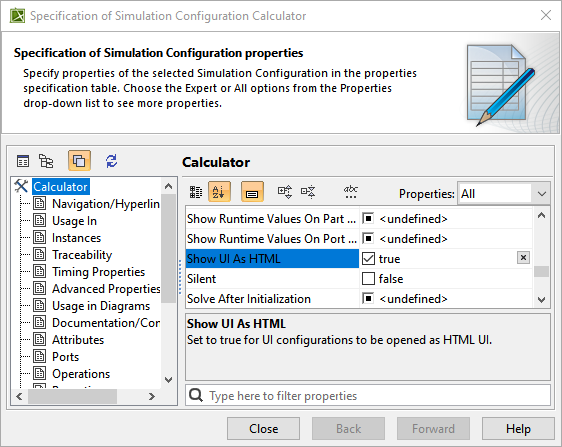
The Specification window of a Simulation Configuration with the Show UI As HTML property set to true to auto-generate HTML files.
Server-side Simulation - License setup update
In this release, you can now set up licenses directly through the GUI using the Settings application. If the license setup is already defined in the properties file, the GUI option will be disabled. However, if no license configuration is specified in the properties file, you can use the GUI for setup. To learn more, refer to the Cameo Collaborator for Teamwork Cloud licensing page.
Ability to Send/Receive Signal via redefined port
The Simulation toolkit can now detect if a port was redefined in your specific system and send/receive Signals via redefined ports without altering the original Behavioral design.

The p1 port being redefined by p11 port in the Variables pane.
Modelica Export – Expandable connectors support
In this release, a new stereotype ModelicaBus has been introduced to support the export of expandable connectors to Modelica. Expandable connectors, commonly used to define busses, can now be exported when this stereotype is applied to an Interface Block that types the Proxy Ports. In such cases, the generated Modelica file will include an Expandable Connector instead of a Simple Connector, enabling more flexible component integration.

ModelicaBus present in the Applied Stereotype property cell
Math Engine Improvements
- Arrays in simulation are now set as 1*x matrix to the MathEngine instead of x*1. This allows you to use array-based functions without transposing the matrix.
- Arrays within arrays are now automatically unwrapped and can be used for math operations. For example a=[1,2,3]; b=[4,5,6]; c=[a,b]. This would give c result of [1,2,3,4,5,6]
- “MATLAB only” – String properties are now set to the MATLAB workspace as a String variable instead of a Char Set.
Result Player – New shortcuts
In this release, the Results Player is improved to support easier navigation through failures. When requirements are verified and some steps are failing, the Step Forward and Step Backward buttons now jump directly to the failure points. If you hold the CTRL key, these buttons let you move between individual failed steps. New keyboard shortcuts have also been added: press Space to play or pause, Home to go to the beginning, and End to jump to the end. To learn more, refer to the Results Player page.
Discontinued Integrations
Starting from version 2026x, the Cameo Simulation Toolkit will no longer support the old SIMULIA API. Previously, projects had the option to choose between the old and new APIs. With this change, only the new SIMULIA API will be supported, ensuring improved performance and future compatibility. The new API was introduced in Platform version 2024x FD01; hence, the older platforms will be incompatible for Simulia integration.