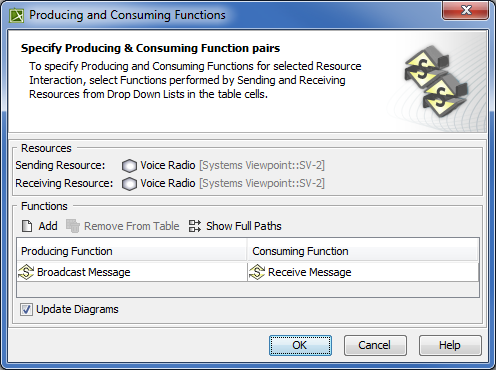
The box and buttons of the dialog are described in the following tables.
Box
Description
Update Diagrams
Select to update all related diagrams. Existing diagrams will be updated by displaying a particular resource interaction as a triangle on every Function Edge connecting producing and consuming function actions. If the specified Producing and Consuming Functions does not exist in any diagram, you will be suggested to create a new SV-4 System Functionality Description Flow (DoDAF), SV-4 Functionality Description Flow (MODAF), or NSV-4 System Functionality Description Flow (NAF) diagram. Producing and Consuming Function actions and the Resource Exchange will be represented in this new diagram.
Button
Description
Add
Click to add a new row for assigning a pair of Producing and Consuming Functions.
Remove From Table
Click to delete a selected Producing and Consuming Functions pair.
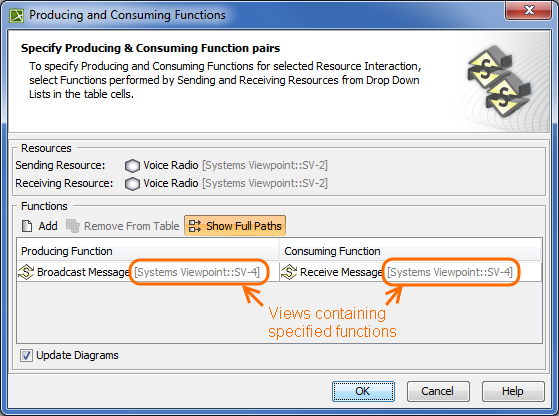
Show Full Paths
Click to show views containing specified functions (see the following figure).
Click once again to hide this information.
To create a pair of producing and consuming functions
Click the Add button.The empty row is displayed in the table.
In the Producing Function column of a selected row, create a new value:
Click the drop-down arrow to open a list of available functions and select one.
Info
If you do not see the list of available functions, click and select the Performed Functions button.
Click the Image Removedthe Image Addedbutton to create a new or select a function existing in the model. The Select Function dialog opens, wherein you are able to select or create functions.
Perform the same action described above for the Consuming Function column of the same row.