Creating chart objects and setting chart types and stylesTo create a chart in accordance with the specified chart type and style, use the following code: create(chartType : String, chartStyle : String) : Chart |
Where the parameters are: If you do not specify the chart style, the default style of the chosen chart type is used. |
A code example: #set($linechart = $chart.create("Line", "Line")) |
Setting chart titlesTo set the chart title, use the following code: For example: $linechart.setTitle("Line Chart") |
If you do not enter the chart title, the default title “Sample” is used. |
Setting chart data categoriesTo create a matrix data table, set the data categories or row headers for the tag value of each data series/column by using the following code: $linechart.setCategories(categories : Collection) |
For example: #set($categories = $array.createArray())
#set($void = $categories.add("TagA"))
#set($void = $categories.add("TagB"))
#set($void = $categories.add("TagC"))
#set($void = $categories.add("TagD"))
$linechart.setCategories($categories) |
From the sample code above, the row headers of the chart are set. Setting chart data seriesTo create a matrix data table, set the data series or column headers by using the following code: $linechart.createSeries(seriesName : String) : DataSeries |
For example: #set($series = $linechart.createSeries($element.name)) |
Setting a data source for each data seriesTo prepare a data source for each of the data series, use the following code: setDataSources(dataSource : Collection) |
For example: #foreach($element in $sorter.sort($MyElement))
#set($series = $linechart.createSeries($element.name))
#set($dataSources = $array.createArray())
#set($void = $dataSources.add("$element.tagA))
#set($void = $dataSources.add("$element.tagB))
#set($void = $dataSources.add("$element.tagC))
#set($void = $dataSources.add("$element.tagD))
#set($void = $series.setDataSources($dataSources))
#end |
Printing a chart to a reportTo print a chart to a report, use the following code: For example: 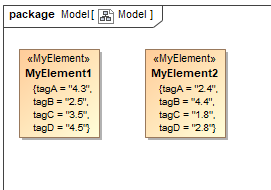
A sample model used to extract values for creating a chart.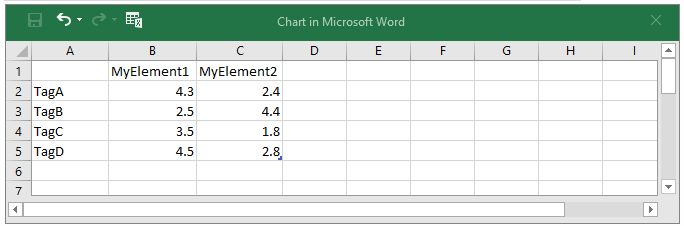
Tag values from a model mapped into a matrix table using the Chart tool to create a chart.A full sample of the Chart tool code is shown below: #import('chart', 'com.nomagic.reportwizard.tools.ChartTool')
#set($linechart = $chart.create("Line", "Line"))
$linechart.setTitle("Sample")
#set($categories = $array.createArray())
#set($void = $categories.add("TagA"))
#set($void = $categories.add("TagB"))
#set($void = $categories.add("TagC"))
#set($void = $categories.add("TagD"))

$linechart.setCategories($categories)
#foreach($element in $sorter.sort($MyElement))
#set($series = $linechart.createSeries($element.name))
#set($dataSources = $array.createArray())
#set($void = $dataSources.add("$element.tagA))
#set($void = $dataSources.add("$element.tagB))
#set($void = $dataSources.add("$element.tagC))
#set($void = $dataSources.add("$element.tagD))
#set($void = $series.setDataSources($dataSources))
#end
$linechart.buildChart() |
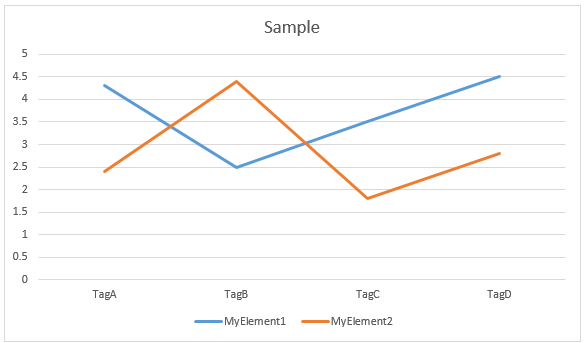
A chart printed to a report after applying the full sample code using the Chart tool. |