On this page
Assigning users to categories
In the Resources application, you can assign users to a specific category by giving them a certain role. As a result, the permissions of that role are applied to the user in the scope of the category.
To assign users to a category
- In the Resources application, find the category that you want to assign users to.
- Click
 next to the category and select Change assignments.
 In the category assignments screen, use the search box to find and select the user you want to assign. The selected user is added and displayed in the Assigned users/groups list.
Click the Add new role box and select the role you want to add. The assigned role is displayed on the bottom of the user card.
If you want to change the roles of the user who is already assigned to the category, select the Find user/group tab and use the search box to find the user whose roles you want to change.

- If needed, repeat steps 2 and 3 to assign more users to the category.
- Click
 in the top right corner of the resource assignments screen to save the assigned users.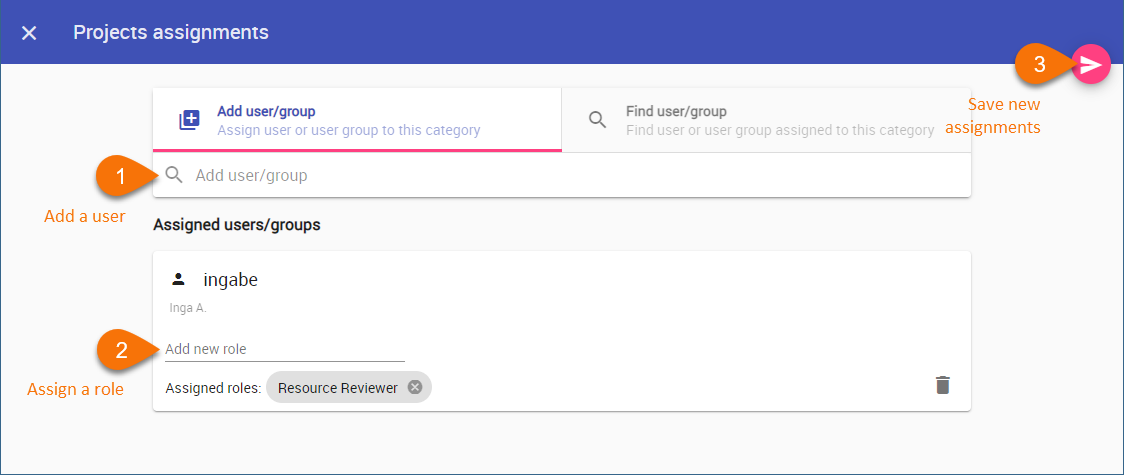
The added users are assigned to the category and given the selected roles in the category scope.
Removing users from categories
You can use the Resources application to remove the users assigned to a specific category.
To remove users from a category
- In the Resources application, find the category that you want to remove users from.
- Click next to the category and select Change assignments.
- In the category assignments screen, select the Find user/group tab and use the search box to find the user you want to remove.
- In the bottom right corner of the user card, click
 to remove the user.
 - Click in the top right corner of the category assignments screen to save the changes.