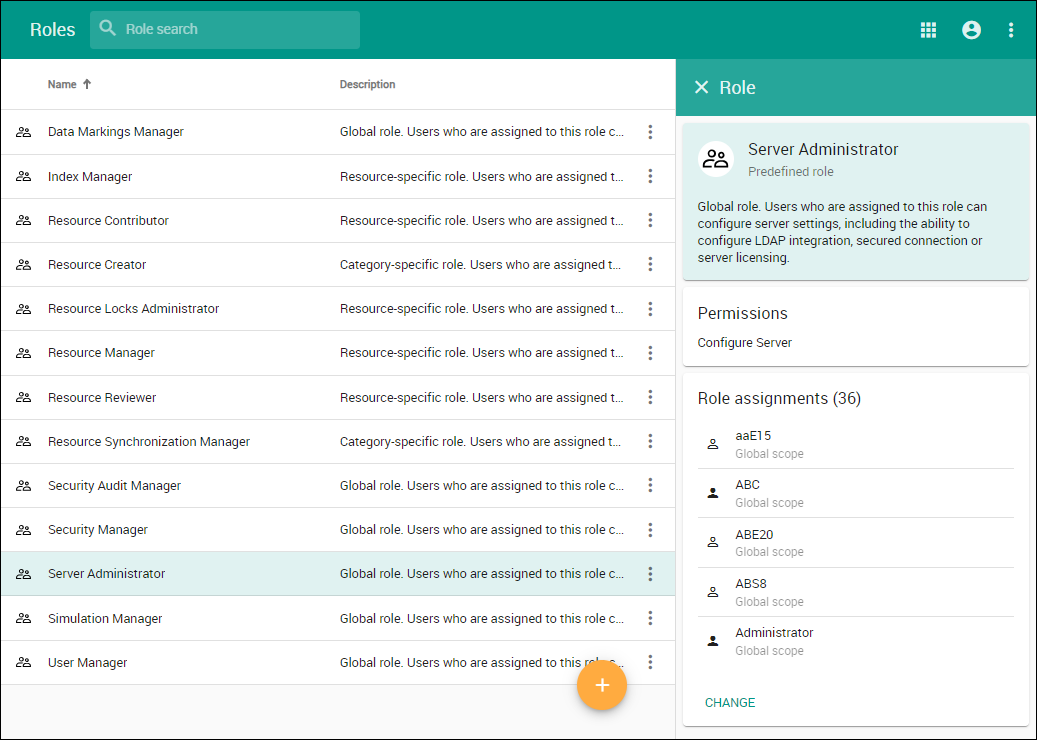
| Role | Permissions | Description | Scope |
|---|
| Index Manager | Administer Resources | The user must also have the Edit Resources and Edit Resource Properties permissions to enable listed actions; otherwise, the resources will be read-only. The user with these three permissions can: - Use local and server resources
- Stop using resources in the resource (including Standard/System Profiles)
- Lock/Unlock usages. Change versions of used resources
- Update resources from a local file
- Reload usages from a local file
- Import usage to a resource
- Migrate resources to a newer version
- Upgrade resources to new versions of Standard/System Profiles
- Set a resource as the latest
- Export packages to a new resource
- Reset element IDs (reset resource IDs)
- Create a branch
- Remove a branch
- Rename a branch
| Global/Resource specific |
| List All Resources | The user with this permission can see all resources and access them. | Global/Resource specific |
| Data Markings Manager | Mark Data | The user with this role can mark or unmark Users, User Groups, Resources, and Categories with predefined clearance and classification levels. | Global |
| Resource Contributor | Edit Resources | The user with this permission can edit the resource contents. This includes the ability to change or augment the model. | Global/Resource specific |
| Edit Resource Properties | The user with this permission can edit resource properties, or change the name or description of the resource. | Global/Resource specific |
| Read Resources | The user with this permission can read the resource contents. This includes the ability to open and review models. | Global/Resource specific |
| Creator | Create Resource | The user with this permission can create resources. This also includes the ability to add resources to the server. | Global/Category specific |
| Manage Categories | The user with this permission can categorize resources, including the ability to create, delete, or edit existing categories. | Global |
| Resource Locks Administrator | Read Resources | The user with this permission can read the resource contents. This includes the ability to open and review models. | Global/Resource specific |
Release Resource Locks | The user with this permission can release other users' locks in a resource. | Global/Resource specific |
| Resource Manager |  Administer Resources Administer Resources
| The user is required to also have the Edit Resources and Edit Resource Properties permissions to enable listed actions, otherwise, the resources will be read-only. The user with these three permissions can: - Use local and server resources
- Stop using resources in the resource (including Standard/System Profiles)
- Lock/Unlock usages. Change versions of used resources
- Update resources from a local file
- Reload usages from a local file
- Import usage to a resource
- Migrate resources to a newer version
- Upgrade resources to new versions of Standard/System Profiles
- Set a resource as the latest
- Export packages to a new resource
- Reset element IDs (reset resource IDs)
- Create a branch
- Remove a branch
| Global/Resource specific |
| Edit Resources | The user with this permission can edit the resource contents. This includes the ability to change or augment the model. | Global/Resource specific |
| Edit Resource Properties | The user with this permission can edit resource properties, or change the name or description of the resource. | Global/Resource specific |
 List All Users List All Users
| The user with this permission can see all users. | Global |
| Manage Model Permissions | The user with this permission can manage model-level permissions. This permission automatically includes the List All Users permission. | Global/Resource specific |
| Manage Owned Resource Access Right | The user with this permission can manage resource-specific access rights, including the ability to grant or revoke user roles in the limited resource scope. This permission automatically includes the List All Users permission. | Global/Resource specific |
| Read Resources | The user with this permission can read the resource contents. This includes the ability to open and review models. | Global/Resource specific |
| Remove Resource | The user with this permission can delete resources. | Global/Resource specific |
| Resource Synchronization Manager | Create Resource | The user with this permission can create resources. This also includes the ability to add resources to the server. | Category-specific |
| Manage Categories | The user with this permission can categorize resources, including the ability to create, delete, or edit existing categories. | Category-specific |
| Administer Resources | The user is required to also have the Edit Resources and Edit Resource Properties permissions to enable listed actions, otherwise, the resources will be read-only. The user with these permissions can: - Use local and server resources
- Stop using resources in the resource (including Standard/System Profiles)
- Lock/Unlock usages. Change versions of used resources
- Update resources from a local file
- Reload usages from a local file
- Import usage to a resource
- Migrate resources to a newer version
- Upgrade resources to new versions of Standard/System Profiles
- Set a resource as the latest
- Export packages to a new resource
- Reset element IDs (reset resource IDs)
- Create a branch
- Remove a branch
| Category-specific |
| Resource Reviewer | Read Resources | The user with this permission can read the resource contents. This includes the ability to open and review models. | Global/Resource specific |
| Security Audit Manager (global role) | Access Reports | Users with this permission can access the Reports application. | Global |
| Security Manager (global role) | Configure Data Markings | The user with this permission can see the Data markings menu item in the Settings application. | Global |
List All Resources | The user with this permission can see all resources and access them. | Global |
| List All Users | The user with this permission can see all users. | Global |
| Manage Security Roles | The user with this permission can manage roles, including the ability to create, edit, or delete roles. | Global |
| Manage User Permissions | The user with this permission can manage user-level permissions, including the ability to grant or revoke roles in unlimited scope. | Global |
| Server Administrator (global role) | Configure Server | The user with this permission can configure server settings, including the ability to configure a secured connection, LDAP connection, and manage server licenses. | Global |
| User Manager (global role) | Create User | The user with this permission can create new server users. | Global |
| Edit User Properties | The user with this permission can edit user details. | Global |
| List All Users | The user with this permission can see all users. | Global |
| Manage User Groups | The user with this permission can manage user groups, including the ability to create, edit, or delete user groups. | Global |
| Remove User | The user with this permission can delete users. | Global |