In this section of the Server settings page, you can specify the password complexity and lifecycle requirements for internal users.
| Every time the password complexity rules are changed, all internal users must change their password, even if the current password complies with the requirements. |
Setting password complexity requirements
To set the requirements of password complexity
- In the Server settings page, select the Complexity tab in the Password complexity & lifecycle requirements section.
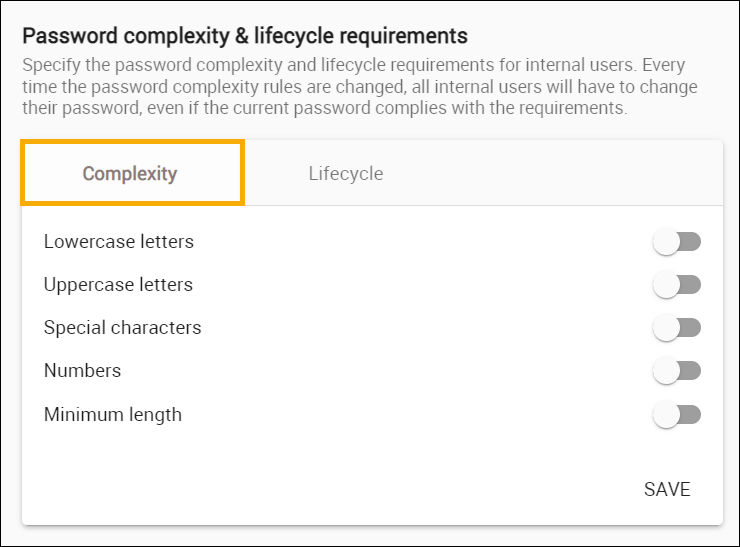
- Enable the password complexity requirements that passwords must meet.
- Select if the password must contain the following:
- Lowercase letters and/or
- Uppercase letters and/or
- Special characters and/or
- Numbers;
- Select if the password must be of any minimum length.
- If you selected the Minimum length requirement, enter the minimum length in the Password minimum length field.
- Click SAVE.
Setting password lifecycle requirements
To set the requirements of password lifecycle
- In the Server settings page, select the Lifecycle tab in the Password complexity & lifecycle requirements section.
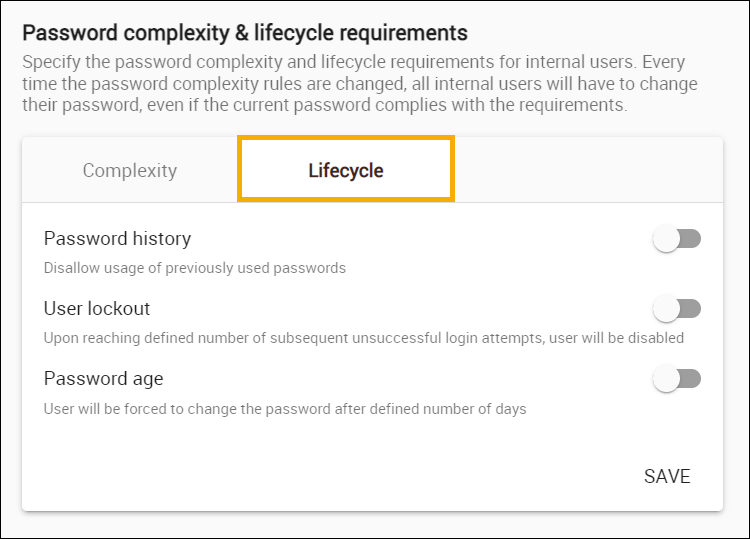
- Enable the password lifecycle requirements that passwords must meet.
- Password history: you can forbid users from selecting previously used passwords.
If you enable this option, enter the number of ... in the Number of passwords field. - User lockout: you can choose to disable a user upon reaching a defined number of subsequent unsuccessful login attempts.
If you enable this option, enter the number of allowed unsuccessful login attempts in the Number of tries field. - Password age: you can force users to change the password after a defined number of days.
If you enable this option, enter the number of allowed unsuccessful login attempts in the Number of days field.
- Click SAVE.