Before creating this diagram, the Service Process diagram must be created first. |
To create a Service Process Flow diagram for Service Function Action flows
- Do one of the following:
In the diagram palette, click the Swimlanes and then click the diagram pane. The Select Swimlane Representatives dialog opens. In the dialog, you can choose the Service or Service Role to be represented by the swimlane.
If you click Cancel in the dialog, the empty Swimlanes will be created. - Drag the Service or Service Role from the Containment tree directly to the diagram pane to create the Swimlane.
- Create Service Function Action or drop Service Function from the Containment tree directly to the diagram pane.
- Connect Service Function Action with Service Control Flow or Service Object Flow.
Creating the inner Process Flow diagrams
Before creating the inner Process Flow diagram, the Process diagram should be created, and the resource structure should be defined there.
Let's say you have a defined structure and create the Service Process Flow diagram with the top element as a Swimlane representative.
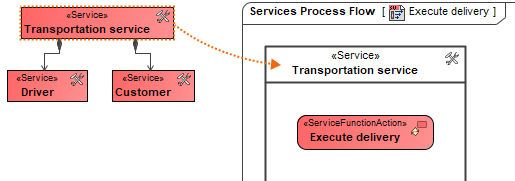
The Service Process Flow diagram is created. In the Swimlane, you can add either Service Function Action or Service Action. In both cases, you can create an inner Service Process Flow diagram for a Service Function Action or Service Action Smart Manipulator toolbar.
To create a Service Process Flow diagram from Smart Manipulator of a Service Function Action or Service Action
- In the Swimlane, select a needed Service Function Action or Service Action.
- In the Smart Manipulator toolbar, click Service Process Flow.
The Select Swimlane Representatives dialog opens. In the dialog, you can choose the Service or Service Role to be represented by the swimlane.
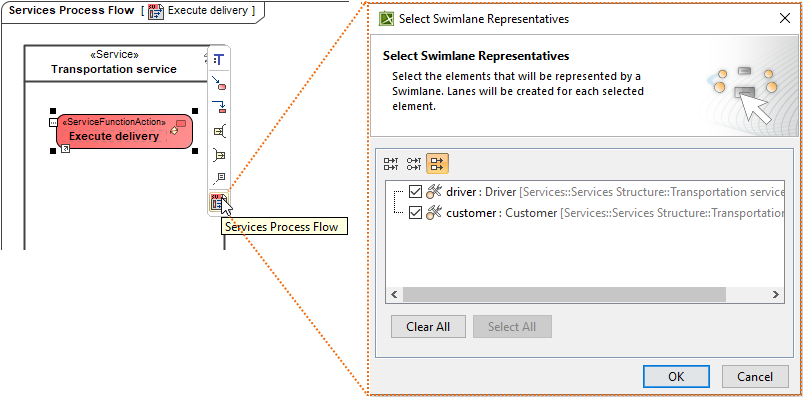
- The Select Swimlane Representatives dialog is displayed only when you have a resource structure defined in the Process diagram.
- If you click Cancel, the empty diagram will be created.
Click OK.
A new Service Process Flow diagram is created with a Swimlane and the selected performers as the representatives.
When the Service Function Action is created in the Swimlane, the IsCapableToPerform relationship is created between the Service and Service Function (the behavior of the Service Function Action).
Related pages