A relation map allows visual analysis among multiple levels of abstraction, such as how requirements are satisfied by other model elements. The relation map enables you to show existing relationships, visualize multilevel relationships, observe traceability from requirements to implementation, or any other analysis you need.
The relation map is useful for:
- Making fast analysis and overview of a model.
- Observing traceability from requirements to implementation all the way through different levels of abstraction (such as analysis, design, etc.).
- Discovering the requirements structure.
You are not allowed to edit relations in the relation map diagram. |
To create a relation map
- From a package or requirement shortcut menu in the Containment tree, select Create Diagram and then select one of the following:
- Requirement Containment Map.
- Requirement Derivation Map.
- Type a diagram name.
- Specify a relation criterion, element type, and scope.
- Click the Refresh button.
The following figure shows how particular requirements satisfy particular model class elements.
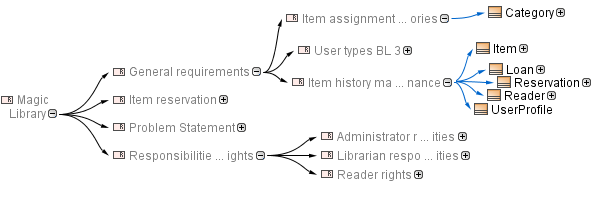
Example of relation map
For detailed instructions on how to use relation maps, see Relation Map.