When Cameo Collaborator comments are stored as model elements, you can create new textual comments and replies either directly in the diagram where the commented element is displayed or in the Containment tree.
To create a Cameo Collaborator comment in a diagram
- Open the diagram where the element that you want to create a comment for is displayed.
- In the diagram palette, click Collaborator Comment and click anywhere on the diagram pane to create a comment.
- Enter comment text on the shape of the comment and click anywhere on the diagram pane to save it.
- Create an Anchor from the comment to the commented element.
Find the new comment in the Containment tree of your project and move it to the Package with the «CollaboratorComments» stereotype. This Package name is typically the same as the project.
If this is the first Cameo Collaborator comment created in the project and the Package with the «CollaboratorComments» stereotype does not exist, create a Package dedicated to comments and apply the «CollaboratorComments» stereotype to it. Then place the newly created comment in this Package. All Cameo Collaborator comments must be stored in that Package to be valid and visible in a published document. |
The Cameo Collaborator Comment will be visible in a published document once you commit changes to the server and refresh the document. If you want to create comments in the Containment tree of your model, you can do it as described below.
To create a Cameo Collaborator comment in the Containment tree
In the Containment tree of your model, right-click the Package with the «CollaboratorComments» stereotype and select Create Element > Comment.
If this is the first Cameo Collaborator comment created in the project and the Package with the «CollaboratorComments» stereotype does not exist, create a Package dedicated to comments and apply the «CollaboratorComments» stereotype to it. All Cameo Collaborator comments must be stored in such a Package to be valid and visible in a published document. |
- Type the text of the comment and press Enter.
- Right-click the created comment and select Refactor > Convert To > More Elements > Collaborator Comment.
- Open the Specification window of the new Cameo Collaborator comment, select the specification cell of the Annotated Element property, and click
 .
. - On the left side of the Select Elements dialog, select the element the comment is created for and click
 to add it to the selected elements area.
 - Click OK and close the Specification window.
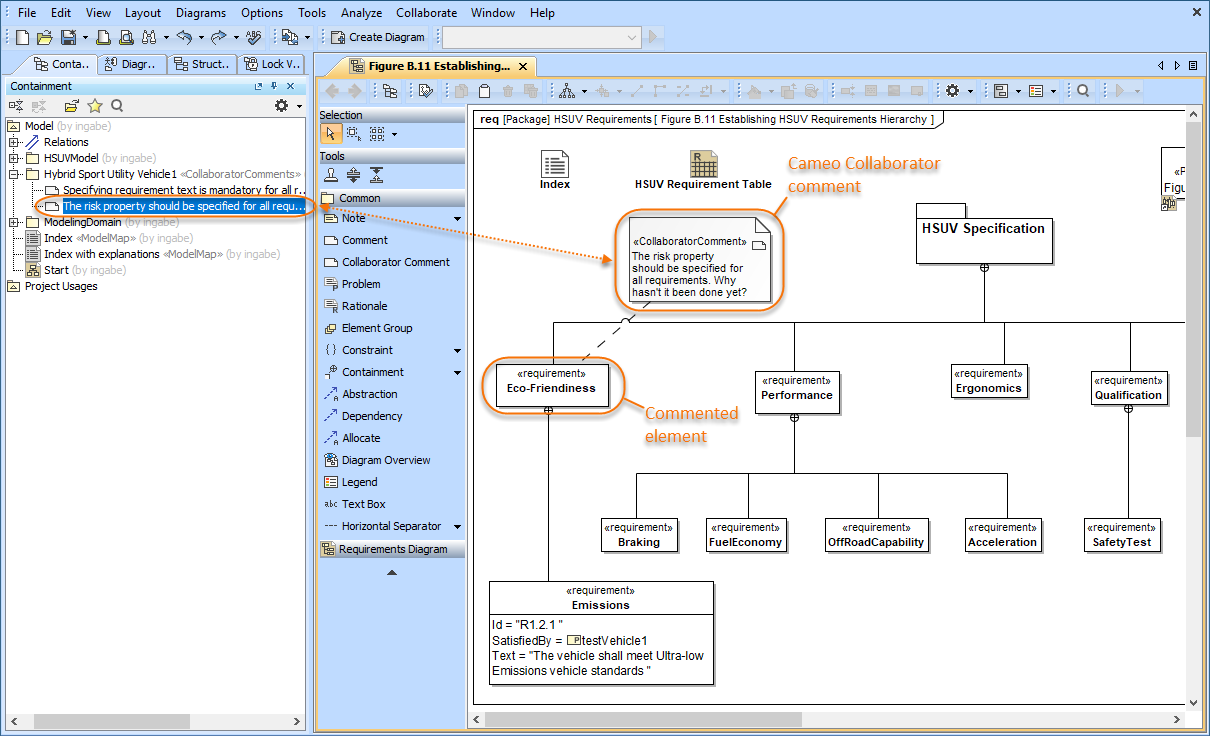
This figure shows Cameo Collaborator comments in a diagram and the Containment tree.