On this page
Creating Services Internal Connectivity diagram
To create a Services Internal Connectivity diagram
- Create Service Roles.
- Associate Service Roles using Service Connectors.
- Create Service Exchanges flowing via Service Connectors.
Creating Service Exchange in Service Internal Connectivity diagram
To create a Service Exchange in the Service Internal Connectivity diagram
- Open the Realized Service Exchange wizard by doing one of the following:
- On the diagram pane, select the Service Connector, and in the smart manipulator toolbar, click
 .
. - On the diagram palette, click
 and then click the Service Connector.
- On the diagram pane, select the Service Connector, and in the smart manipulator toolbar, click
Specify the Service Exchange, Conveyed Item, and Direction.
- Click Next to specify Producing and Consuming Service Functions.
- Click Finish when you are done.
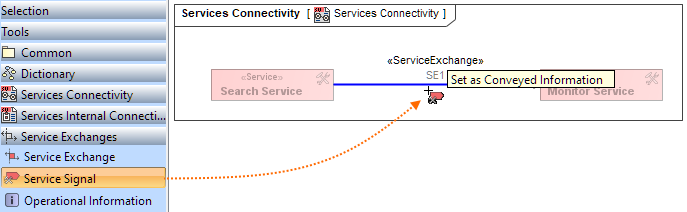
If you did not specify the Conveyed Item while creating the Service Exchange, you can set it later, directly in the diagram picking the needed element from the diagram palette.
To specify the Conveyed Item directly on the diagram pane
- In the diagram palette, select the needed Conveyed Item.
- Drag the selected Conveyed Item on to the needed Service Exchange on the diagram pane. The Realized Service Exchange wizard opens.
- Follow the steps of the wizard.
- Click Finish when you are done.
You can use Service Exchange Manager dialog to analyze and manage the Service Exchange data. |
UAF Behavior to structure synchronization. You can check the consistency of the Services Internal Connectivity diagram with Service Functions, automatically detect inconsistencies, and handle each inconsistency individually using solver actions to ensure the coherence of the Services Internal Connectivity diagram. |
Related pages