This tab will appear in the Window menu only if the SysML plugin is installed. |
The Structure tab toolbar contains the following buttons:
Button | Tooltip text | Description |
| Collapse All | Collapses all of the currently expanded elements in the Containment tree. |
| Collapse Selected Recursively | Collapses only selected node and all subnodes in that node. |
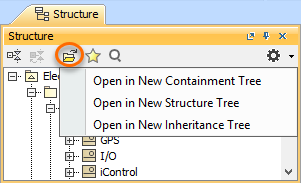
| Open in New Tree | Opens the contents of the selected element in a new tab of the Model Browser. The selected element becomes the root node of the new tree. You can choose to open elements in:
|
| Favorites | Opens the Favorites menu for choosing to do one of the following:
|
| Quick Find | Opens the Quick Find dialog. |
| Options | Click to open the Options menu and then select:
|