On this page
Cameo Data Modeler provides the standard type libraries as well as ability to model user defined types (structured user defined types and composites - multiset, array data types). The types can then be used to specify columns of the tables and / or parameters of procedures and functions. There is also a special mechanism for using types with modifiers. This mechanism is common in the MagicDraw, however some explanation is necessary on how to use it in database modeling.
Cameo Data Modeler provides predefined type libraries for database flavors it supports. Besides the standard SQL type library, there are type libraries for Oracle, DB2, MS SQL, MySQL, PostgreSQL, Sybase, Cloudscape (Derby), Pervasive, MS Access and Pointbase. The standard SQL type library is the main type library, and type libraries for each flavor import (a subset of) types from it and define additional types, specific for that flavor.
The necessary type library is imported when you create the Database or Schema element in your model and choose a flavor for it (See the Database flavor selection dialog in Top level elements).

Usage of a simple SQL type, such as boolean, is very simple. If you want to set it as a type of a column or operation parameter, you just need to specify it in the type field. However, there are types (such as varchar or numeric) in SQL, which require additional data. There are two mechanisms to specify these kinds of types: either use the library type+ type modifier mechanism or create your own type element.
Let's take the standard varchar type as an example. It must have the maximum length data provided at each usage. Semantically there are many different types, one for each length limit - varchar(20), varchar(53), varchar(255) etc. Now the standard type library cannot provide myriad of different varchar types. Library only provides the varchar type definition.
To specify that column is of varchar(20)
Alternative way to specify that column is of varchar(20) is to explicitly create a separate type in the model.
To specify that column is of varchar(20) in the alternative way
There would be one type in the model for each varchar length that you use in your database.
The second way is more tedious - you need to create quite a few types. Therefore, by default, the first way is used. But the second way has several advantages, that may outweigh it’s deficiencies. First - there is one spot where parameters of the type can be changed. You can easily widen the varchar(20) fields to varchar(40) by editing just one place in the model. Secondly, you can define some additional parameters of the type - such as character set.
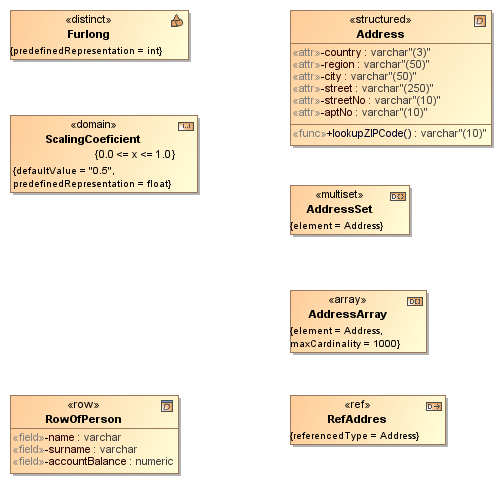
Besides the primitive / built-in types of the database, user can define additional types for his own schema.
| SQL Distinct type is modeled as UML DataType with «DistinctUserDe- finedType» stereotype applied. For the sake of compactness, refer- ences are displayed with the «distinct» keyword (instead of the long form - «DistinctUserDefinedType») on the diagram. |
Distinct type definition allows to redefine some primitive type in order to enforce the non-assignability rules. For example, two distinct types Meters and Yards can be defined on the base primitive type float. With this definition, system would enforce checks that yard fields / columns are not assigned to meter fields / columns without a conversion (explicit cast).
Besides the standard SQL element properties, distinct type has the following properties available in the Specification window.
| Property name | Description |
|---|---|
Predefined Representation | Points to some base primitive type. |
SQL Domain is modeled as UML DataType with «Domain» stereotype applied. For the sake of compactness, domains are displayed with the «domain» keyword on the diagram. |
Domain allows to define a more narrow set of values than the base primitive type allows. This narrowing is done by assigning additional constraints on the domain. Columns, whose types are set to the domain, can only assume values from this more narrow subset.
Besides the standard SQL element properties, domain has the following properties available in the Specification window.
| Property name | Description |
|---|---|
Predefined Representation | Points to some base primitive type. |
| Default Value | Default value for the column if no value is specified. |
SQL Structured User Defined Type is modeled as UML DataType with «StructuredUserDefinedType» stereotype applied. For the sake of com- pactness, domains are displayed with the «structured» keyword (instead of the long form - «StructuredUserDefinedType») on the diagram. |
Structured UDT defines a composite datatype. Each value of this type is a tuple of several values; each position in a tuple has a name. Structured UDT value is analogous to one row of the table. Structured UDTs allow single inheritance (multiple inheritance is not supported). Inheritance (subtype-supertype relationship) can be modeled using UML Generalization relationships.
Besides the standard SQL element properties, structured UDT has the following properties available in the Specification window.
| Property name | Description |
|---|---|
Instantiable | Defines |
Final | Default value for the column if no value is specified. |
Super | Shows base data types. This is a derived field, it is not editable. To make changes, use UML Generalization relationships. |
Parts of the structured UDT (properties) are called attributes (compare - parts of the table definition are called columns). Attributes of structured UDT are created like columns of the table, that is, via the Attribute Definitions tab in the structured UDT Specification window or using an appropriate smart manipulation button on its shape.
Besides the standard SQL element properties, attribute has the following properties available in the Specification window.
| Property name | Description |
|---|---|
| Type | Collectively these two fields describe the type of the attribute. The same considerations as for column type modeling apply. |
| Type Modifier | |
| Default Value | Carries the default value of the attribute. |
| Scope Check | Marks this attribute as scope checked to a particular table and allows choosing particular referential integrity ensuring action (RESTRICT CASCADE, etc). |
| Scope Checked |
Besides attributes, Structured UDTs have a collection of methods - operations, performing actions on values of this type. Methods are covered in a separate section with stored procedures and functions (see Routines section).
SQL Array type is modeled as UML DataType with «ArrayDataType» stereotype applied. For the sake of compactness, arrays are displayed with the «array» keyword (instead of the long form - «ArrayDataType») on the diagram. |
Array type defines an array (that is, list of values, with the indexed, O(1) access to the n-th element) of the values of elementary type. Besides the standard SQL element properties, array type has the following properties available in the Specification window.
| Property name | Description |
|---|---|
Element | The elementary type of the set elements. |
Max Cardinality | The size limit of the array. |
SQL Multiset type is modeled as UML DataType with «MultisetDataType» stereotype applied. For the sake of compactness, multisets are displayed with the «multiset» keyword (instead of the long form - «MultisetDataType») on the diagram. |
Multiset type defines a set of elements of the elementary type. Besides the standard SQL element properties, multiset has the following properties available in the Specification window.
| Property name | Description |
|---|---|
Element | The elementary type of the set elements. |
SQL Reference type is modeled as UML DataType with «ReferenceDataType» stereotype applied. For the sake of compactness, references are displayed with the «ref» keyword (instead of the long form - «ReferenceDataType») on the diagram. |
Reference type defines a pointer to the data of the referred type. Besides the standard SQL element properties, reference type has the following properties available in the Specification window.
Property name | Description |
|---|---|
Referenced Type | The type of the data that is being referenced. |
Scope Table | Limit the references to the data of the particular table. |
SQL Row Data Type is modeled as UML DataType with «RowDataType» stereotype applied. For the sake of compactness, row data types are displayed with the «row» keyword (instead of the long form - «RowDataType») on the diagram. |
Represents one row of the table. The difference from structured UDT is that row type represents a value stored in the table, while structured UDT represents “free-floating” value during computation. For example, it is meaningful to take address for the row, but not of the structured UDT value.
Parts of the row data type (properties) are called fields (compare - parts of the table definition are called columns). Fields for row data type are created like columns of the table, that is, via the Fields tab in the row data type Specification window or using an appropriate smart manipulation button on its shape.
Besides the standard SQL element properties, field has the following properties available in the Specification window.
Property name | Description |
|---|---|
Type | Collectively these two fields describe the type of the field. The same considerations as for column type modeling apply. |
Type Modifier | |
| Scope Check | Marks this field as scope checked to a particular table and allows choosing particular referential integrity ensuring action (RESTRICT CASCADE, etc). |
| Scope Checked |