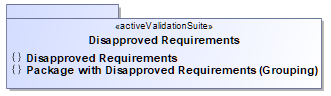
Specifying the Parent Rule and Parent Object properties for validation rules allows you to relate validation rules and group their validation results hierarchically in the Validation Results panel for easier analysis.
To specify the Parent Rule and Parent Object properties
Open the Specification window of the validation rule whose results you want to group in the Validation Results panel. How to open the Specification window >>
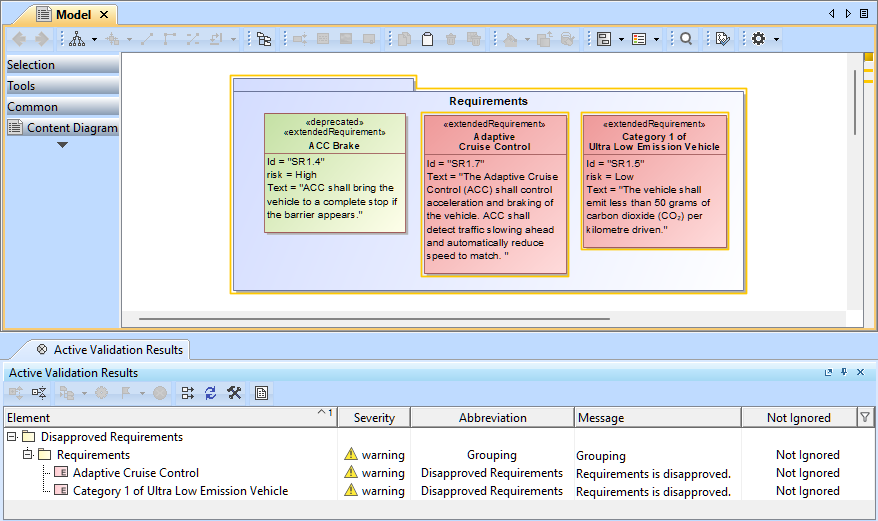
Now, in the Validation Results panel, elements that fail validation will display their failed elements as child items.
In this example, we define two validation rules:
Disapproved Requirements – identifies requirements with the status value Disapproved.
Package with Disapproved Requirements – identifies packages that contain at least one requirement with a Disapproved status.
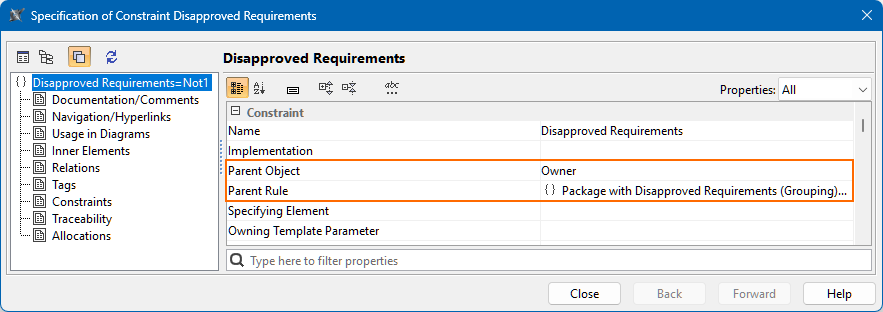
Then we set the Parent Rule and Parent Object properties for the Disapproved Requirements validation rule:
Parent Rule property is set to the Package with Disapproved Requirements validation rule. This links the requirement rule to the package rule.
Parent Object property is set to a Simple Navigation expression with the Owner criterion. This ensures failed requirements are grouped under their owning package in the Validation Results panel.
As a result, the individual requirement failures (raised by the Disapproved Requirements validation rule) are grouped under the requirements' parent package failure (raised by Package with Disapproved Requirements) in the Validation Results panel.
To explore the example further, please find the attached sample project parent rule and parent object of validation rules.mdzip. |