On this page
You can index resources for their element usages within the selected scope of the Magic Collaboration Studio repository and later query these usages through the modeling tool. This enables you to evaluate what impact modifying or deleting certain model elements will have on other models that are using it. To enable this functionality, Magic Collaboration Studio needs to be incorporated with a dedicated search engine - Elasticsearch. This component makes it possible to index model element usage data and serve it quickly when queried from a modeling tool.
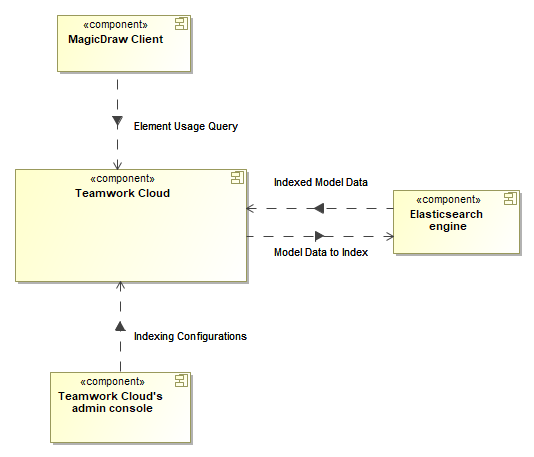
Conceptual solution for the global element usage indexing and search functionality.
Elasticsearch system requirements and installation
To start using the global element usage search functionality, you need to install Elasticsearch (v7 series).
System requirements
- We recommend using NVMe SSD disks for the Elastic search instance.
- The -Xmx value should be set to 4GB as a minimum.
- The expected indexing speed under recommended hardware settings is roughly 1 revision per second.
- The following formula can be used to roughly determine the required disk space per single Indexing Configuration:
Used Project size (element count) x 400 bytes x N x # of Using Projects (specified scope),
where N equals the number of times both using and used elements get changed throughout their history (N tends to range from 4 to 10 as noted from experiments with production data).
The formula also assumes that actual element-level reference ratio is 15-20% from all of the elements in a Used Project.
E.g. A DB size of 250GBs yields an index size of 60GBs under the above mentioned conditions.
Installing Elasticsearch
Go to https://www.elastic.co/downloads/elasticsearch and install Elasticsearch (v7 series).
We highly recommend deploying Elasticsearch on a machine separate from Magic Collaboration Studio and Cassandra due to additional server resource consumption. |
In the Elasticsearch installation directory, open the jvm.options file and make sure the -Xms and -Xmx properties are uncommented. |
Enabling global element usage indexing and search
Once you install Elasticsearch, configure Magic Collaboration Studio as described below to start using the global element usage search functionality.
To enable global element usage search
- Go to <install_root>/TeamworkCloud/configuration, open the application.conf file, and add the following lines at the end of the file:
To enable the querying component, add the following property and set it to true:
esi.server.actor.query.component-enabled=true
To enable resource indexing, add the following property and set it to true:
esi.indexer.enabled = true
If Elasticsearch and Magic Collaboration Studio run on different machines, add the following line:
esi.query.es.node.host = "<es.host.or.ip>"
If Elasticsearch is set up to listen on a different port from the default one (9200), add the following line:
esi.query.es.node.port = <es.port>
- Restart Magic Collaboration Studio services.
Now you can index resources for their element usages in the Settings application and use the global element usage search functionality in a modeling tool.