
A Sequence Flow connects Activities, Choreography Activities, Events, and Gateways. A Conditional Sequence Flow has a condition expression and is drawn with a mini-diamond marker at the beginning of the Sequence Flow A default Sequence Flow is indicated with a backslash at the beginning of the Sequence Flow.
To create a Sequence Flow, do one of the following
To add a condition to Sequence Flow, do one of the following
A Conditional Sequence Flow outgoing from a Gateway is displayed without a mini diamond marker. |
To set a default Sequence Flow
A default Sequence Flow can be specified for Activities (Tasks, Subprocesses, and Call Activities) or exclusive, inclusive, and complex Gateways. |
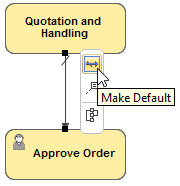
A default Sequence flow does not have a condition expression. |
To change direction of Sequence Flow
Related element
Related diagrams
Related procedures