In addition to UML data, each EA-exported XMI contains EA-specific information. The Enterprise Architect Import Plugin can transform this particular information into UML elements with the stereotypes applied if you include EA-specific data before importing the XMI file. This data includes: - Constraints: name, description, type, weight, and status.
- Requirements: name, description, type, status, difficulty, priority, and last update.
- Scenarios: name, description, type, and weight.
- Files: file path type.
- Requirements (External): type, status, difficulty, priority, last update, created, and note.
- Changes: type, status, difficulty, priority, last update, created, and note.
- Issues: type, status, difficulty, priority, last update, created, and note.
You can access and specify the EA information in the Property dialog in EA. |
To include EA-specific data in the transformation process, the plugin creates a set of stereotypes and tag definitions as the EA Profile. 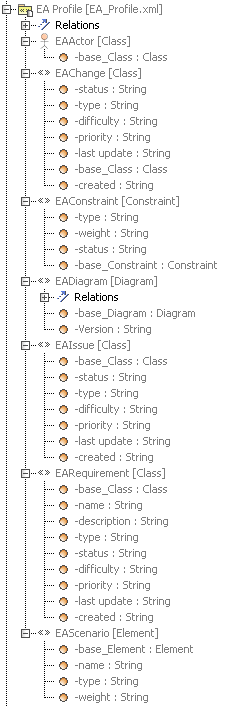
The EA Profile in a treeview.ConstraintsEach EA constraint will be transformed into a UML constraint and <<EAConstraint>> will be applied to the constraint. The properties of an EA constraint will be mapped either to the properties of a UML constraint or to the tag values of <<EAConstraint>>. The following table shows the constraint mapping details. | EA | MagicDraw |
|---|
| name | The name property of a UML constraint. | | description | EAConstraint::type tag value. | | type | EAConstraint::weight tag value. | | weight | EAConstraint::status tag value. | | constraint owner | Constrained Element property point to the constraint owner. |
RequirementsEach EA Requirement will be transformed into a UML Class. Because a Requirement cannot be created in an element that is the owner of a Class in EA, the transformed Requirement will be kept in a separate Package, named EA Requirement. A Realization will then be created from the owner of the Requirement into a transformed Requirement. See the following table for details. | EA | MagicDraw |
|---|
| name | EARequirement :: name tag value | | description | EARequirement :: description tag value | | type | EARequirement :: type tag value | | status | EARequirement :: status tag value | | difficulty | EARequirement :: difficulty tag value | | priority | EARequirement :: priority tag value | | last update | EARequirement :: name update value |
ScenariosEach EA scenario will be transformed into a UML Comment and <<EAScenario>> will be applied to the comment. The properties of a scenario will be mapped either to the properties of each UML Comment or to the tag values of <<EAScenario>>. See the following table for details. | EA | MagicDraw |
|---|
| name | EAScenario::name tag value | | description | The Body property of a UML Comment. | | type | EAScenario :: type tag value | | weight | EARequirement :: weight tag value | | subject | An annotated Element property pointing to an EA subject element. |
FilesEA can add files to a UML element. The information will be transformed into a Hyperlink in MagicDraw. | EA | MagicDraw |
|---|
| Local file | File | | Web address | Webpage. |
Requirements (external)An EA-created Requirement differs from the one you create as an internal element for each element. EA Requirements will appear in the Project Browser and can be pasted on a diagram. Each EA Requirement will be transformed into a Class and <<EARequirement>> will be applied to the Requirement. | EA | MagicDraw |
|---|
| type | EARequirement :: type tag value | | status | EARequirement :: status tag value | | difficulty | EARequirement :: difficulty tag value | | priority | EARequirement :: priority tag value | | last update | EARequirement :: last update value | | created | EARequirement :: created tag value | | note | Documentation |
ChangesEA can create a Change and will export it as a Class. The Class information will be transformed into the <<EAChange>> tag values. See the following table for details. | EA | MagicDraw |
|---|
| type | EAChange :: type tag value | | status | EAChange :: status tag value | | difficulty | EAChange :: difficulty tag value | | priority | EAChange :: priority tag value | | last update | EAChange :: last update value | | created | EAChange :: created tag value | | note | Documentation |
IssuesEA can create an Issue and will export it as a Class. The Issue information will be transformed into the <<EAIssue>> tag values. See the following table for details. | EA | MagicDraw |
|---|
| type | EAIssue :: type tag value | | status | EAIssue :: status tag value | | difficulty | EAIssue :: difficulty tag value | | priority | EAIssue :: priority tag value | | last update | EAIssue :: last update value | | created | EAIssue :: created tag value | | note | Documentation |
|