Creating a diagram
To create a Strategic Constraints Definition diagram
- In the Containment Tree, select the Strategic Constraints Definition and do one of the following:
- From the selected package's shortcut menu, select Create Diagram > Strategic Constraints Definition.
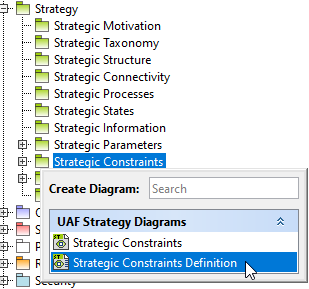
- In the modeling tool's main menu, click Create Diagram, search for Strategic Constraints Definition and select it.
- Name a diagram or leave it with the default name.
Creating an element
When the diagram is created, you can start creating the appropriate elements (assets). An example is described using the Capability element, but the same is valid for other elements.
To create an element in a diagram
- In the diagram palette, click the Capability (or another appropriate element) and then click the appropriate place on the diagram pane.
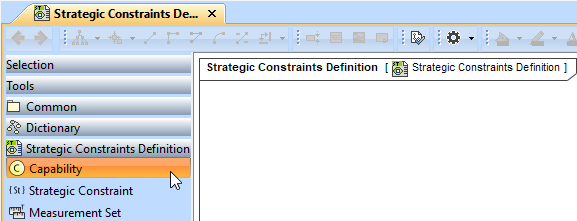
- Name the element.
To create an element in the Containment tree
- Right-click the Strategic Constraints package and from the shortcut menu, select Create Element. Search for the Capability (or another appropriate element) and select it.
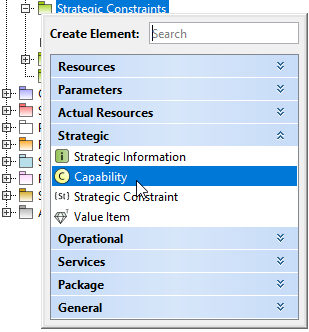
- Name the element.
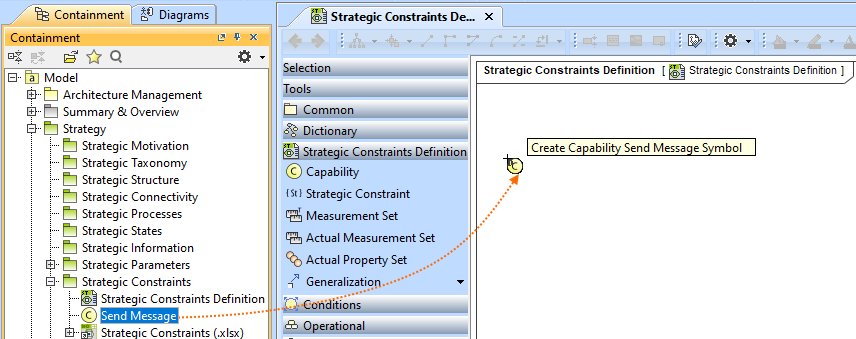
- Drag the created element from the Containment tree to the diagram pane.
To create the elements from other resources (e.g. Word, Excel, HTML)
- Copy a list in your resource.
- In a diagram, press Ctrl+V and from the Paste Special dialog, choose Element.
- From the Select Type dialog, choose Security Enclave (or another appropriate element).
Creating and applying Strategic Constraints
You can create the Strategic Constraints in the same way as other elements - from the diagram palette or in the Containment tree. See Creating an element. Also, you can create constraints in the selected asset's Specification window.
To create a Strategic Constraint in the Specification window
- Select a needed asset and open its Specification window.
- In the Constraints property group, click Create > Strategic > Strategic Constraint.
- Specify the name.
In the Specification cell, define the rule.
The specification (rule) can be defined in English as well as using expressions or formulas (OCL). |
Capability is a constrained element that can be a subject of the Strategic Constraint.
To apply Strategic Constraints, do one of the following
- In the Containment tree, select a Strategic Constraint and drag it on the element.
- In the needed element's Specification window, go to Constraints property group. Click the Apply button and from the Select Element window, choose a constraint.