To work with a Services Roadmap diagram
Create a new Version Of Configuration
To create a new Version Of Configuration in the Service Roadmap diagram
- Click the Add New button and select Version of Configuration.
- Type the name of the newly created Version of Configuration.
Define the Service for the Version Of Configuration
To define the resource for the Version Of Configuration
- Follow the steps of the wizard.
The result of this procedure is as the following figure.
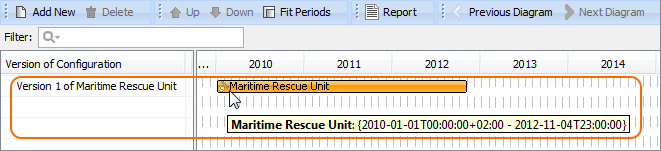
Removing Service from a Services Roadmap diagram
To remove a Service
- Right-click the Service bar, and from the shortcut menu, select Remove > Service <name of the resource you want to remove>.
Removing Version of Configurations from a Services Roadmap diagram
To delete a Version of Configuration
- Select a Version of Configuration.
- On the diagram toolbar, click the Delete button.