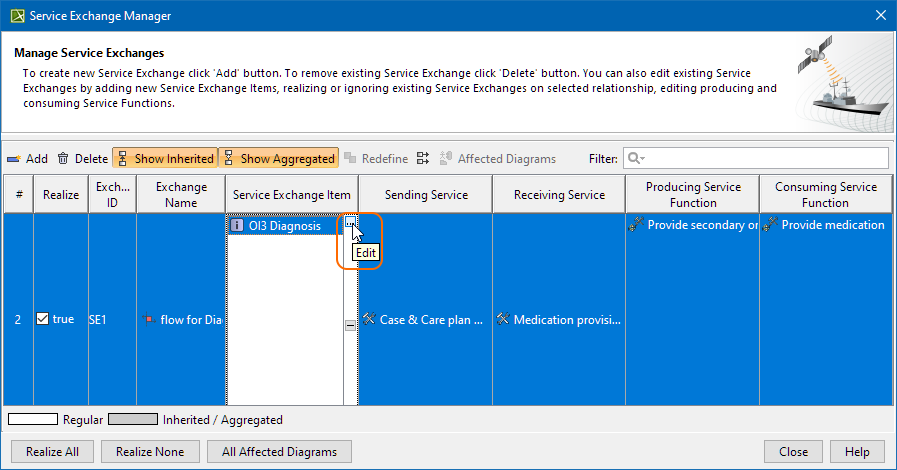
Modeling Tools 2026x UAF 1.3 modeling Dialogs Current: Service Exchange Manager dialog Service Exchange Manager dialog The Service Exchange Manager dialog enables analysis and management of the Service Exchanges data. You can:Edit existing Service Exchanges by adding new Service Exchange ItemsRealize or ignore existing Service Exchanges on selected relationshipsChange the Service Exchange ItemReview producing and consuming Service Function pairs and remove the ones that are not neededReview the list of diagrams that display the Realizing Elements of the selected ExchangeTo open a Service Exchange Manager dialogSelect a Service Association, Service Connector, Service Control Flow, Service Object Flow, or Service Message in the diagram pane.On the smart manipulator, click.The Service Exchange Manager dialog opens.The Affected Diagrams button opens the list of diagrams that are affected by the selected Realized Service Exchange.The All Affected Diagrams button opens the list of diagrams that are affected by all the Realized Exchanges in the Service Exchange Manager dialog. To learn more about previewing affected diagrams, see Preview Affected Diagrams dialog in UAF. Related pagesRealized Service Exchange wizardPreview Affected Diagrams dialog in UAFProducing and Consuming Service Functions dialogWorking with Services Connectivity diagramWorking with Services Internal Connectivity diagramWorking with Services Connectivity tableWorking with Services Role-based Connectivity tableWorking with Services Connectivity matrixWorking with Service Sequences diagramSvcV-6 Services Resource Flow MatrixCreating Resource Exchange in SvcV-10c diagramS2 Service Internal Structure ×