Creating and managing categories
You can organize the project repository by creating categories and grouping projects within them. By default, there is a single category named Uncategorized, but you can create as many categories as you need. The server supports a hierarchical category structure, allowing you to nest categories. Categories can be renamed and removed. In addition, you can move projects from one category to another.

Teamwork Cloud permissions
- To create categories, you must have the Manage Categories permission.
- Project categories are visible only if you have the Manage Categories permission or the Read Resources permission for at least one project within a category.
Creating categories
To create a category
- In the main menu, select Collaborate > Projects.
- In the Manage Projects dialog, do one of the following:
- Select a category and click
 .
. - Right-click a category and select Create Category.
- Select a category and click
In the Create Category dialog, optionally change the parent category by clicking
 next to the Parent box.
- In the Name box, enter the category name.
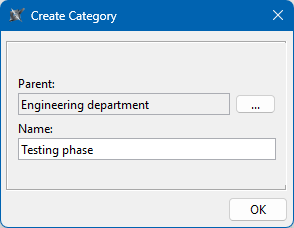
- Click OK.
Renaming categories
To rename a category
- In the main menu, select Collaborate > Projects.
- In the Manage Projects dialog, do one of the following:
- Select a category and click
 .
. - Right-click a category and select Rename Category.
- Select a category and click
- In the Name box of the Rename Category dialog, enter a new category name.
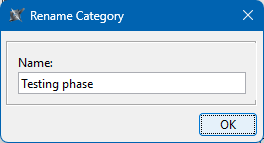
- Click OK.
Moving projects
To move a project to another category
- In the main menu, select Collaborate > Projects.
- In the Manage Projects dialog, do one of the following:
- Select the project you and click
 .
. - Right-click a project and select Move to Category.
- Select the project you and click
- In the Move to Category dialog, select the category you want to move the project to.

If you want to move a project to a new category, click
and create a new category. - Click OK.
Removing categories
Teamwork Cloud permissions
- You need to have the Manage Resources permission to delete a category.
- You need to have the Read Resources and Remove Resources permissions to delete all the resources within a category.
To remove a category
- In the main menu, select Collaborate > Projects.
- In the Manage Projects dialog, do one of the following:
- Select a category and click
 .
. - Right-click a category and select Delete Category.
- Select a category and click
- In the question dialog, click Yes to confirm your decision.